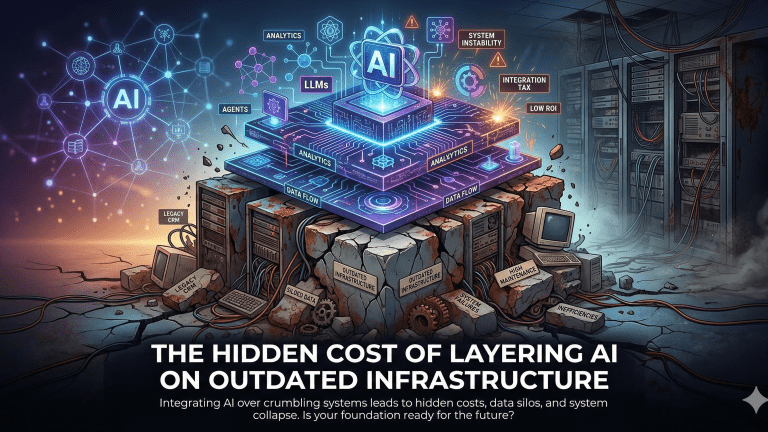
Just like Building a house, AI – Needs a Strong Foundation
Companies often invest heavily in agentic AI, expecting transformative results, only to find their efforts hampered by underlying infrastructure. For instance, an $800,000 investment in cutting-edge AI might yield a mere 12% adoption rate because the legacy CRM systems cannot support the required data flows. This isn’t just a slowdown; outdated infrastructure creates an exponential failure cost, silently eroding ROI and competitive advantage. This article reveals the true cost breakdown and provides a critical decision framework for addressing infrastructure debt before it cripples your AI initiatives.
The Infrastructure Readiness Gap: Why Your Stack Isn’t AI-Ready
Your current technology stack, especially older CRMs and sales tools, was fundamentally built for human workflows, not the autonomous orchestration demanded by agentic AI. Agentic AI requires three critical infrastructure layers: robust data quality and consistency, real-time API connectivity and synchronization, and sufficient compute and processing capacity. Legacy systems frequently lack the APIs or modern data formats needed for seamless AI integration, according to Berkeley CMR.
The silent killers of agentic AI adoption are data silos, batch processing delays, and rigid field structures. These issues break down the continuous, real-time data exchange essential for AI agents to operate effectively and make accurate decisions. Without addressing these foundational weaknesses, AI implementations will struggle to achieve their promised potential, leading to low adoption rates and inflated costs.
The Real Cost Breakdown: Where the Money Actually Goes
Layering agentic AI onto inadequate infrastructure incurs significant financial penalties, both direct and indirect. Direct costs include expensive integration middleware, extensive data cleaning and normalization efforts, API rate limit upgrades, and custom development to bridge system gaps. For example, API and middleware integration can cost $2,000–$9,000 initially, with monthly upkeep ranging from $200–$2,000 as estimated by RTS Labs.
Indirect costs are often far greater. They encompass extended implementation timelines, which can stretch from a projected 2-3 months to 6-9 months for basic agents on modern platforms. Reduced AI accuracy due to poor data quality leads to diminished business outcomes, and ongoing maintenance overhead becomes a constant drain. The opportunity cost is arguably the most damaging: while wrestling with infrastructure, companies lose competitive advantage by delaying the optimization of AI performance and the realization of its strategic benefits.
Photo by Brett Sayles
The 3 Infrastructure Debt Scenarios (And What Each One Costs)
Understanding your company’s infrastructure debt level is crucial for accurately forecasting agentic AI implementation costs and success rates. These scenarios quantify the impact of existing tech stack maturity on AI projects. Gartner predicts that over 40% of agentic AI projects will fail by 2027 due to issues like inadequate foundations.
This table compares three common infrastructure scenarios companies face when implementing agentic AI, showing the real cost and timeline differences based on infrastructure maturity. It helps revenue leaders quickly assess where they fall and what to expect.
Infrastructure Scenario
Total Implementation Cost
Timeline to Production
Expected AI Adoption Rate
Primary Risk Factors
Modern Stack (0-3 years old, clean data)
$200K-$400K
2-3 months
70%+
Minor integration tweaks, user training.
Mid-Age Stack (5-8 years old, moderate data issues)
$600K-$1.2M (incl. fixes)
6-9 months
40-50%
Data normalization complexity, API rate limits, integration middleware.
Legacy Stack (10+ years old, severe data quality issues)
$1.5M-$4M+
12-18 months
15-25% (high failure risk)
Extensive data migration/cleaning, custom API development, system rewrite.
Hybrid Stack (mix of modern and legacy with silos)
$1M-$2.5M (variable)
9-15 months
30-45%
Data governance, conflicting schemas, complex API orchestration.
Greenfield (new implementation, no legacy debt)
$300K-$700K
4-6 months
80%+
Initial setup complexity, vendor lock-in.
The Fix-First vs. Layer-Anyway Decision Framework
The choice between fixing infrastructure first or layering AI directly depends on the severity of your infrastructure debt and your competitive landscape. Trullion analysis suggests that “the real issue is the wrong AI projects being prioritized,” often due to outdated ROI expectations.
When to Fix Infrastructure First
Prioritize infrastructure modernization when you face severe data quality issues (e.g., >30% duplicate or incomplete records), your core systems are older than 8-10 years, or your intended AI use cases are mission-critical and cannot tolerate failures. This approach, while initially slower, builds a solid foundation for sustainable, high-performing AI. Firms with standardized IaC and governance, like JP Morgan Chase, saw 38% fewer incidents after implementing agentic platforms.
When You Can Layer AI Anyway
You can consider layering AI directly if your stack is relatively modern with only isolated data issues, or if the AI use case is non-critical and intended for testing and learning. This strategy is also viable when competitive pressure demands immediate, albeit potentially limited, AI deployment for specific functions. However, be prepared for potential integration nightmares and data silos if foundational problems are ignored.
The Hybrid Approach
The most pragmatic strategy for many enterprises is a hybrid approach. This involves parallel infrastructure modernization while piloting agentic AI in contained environments. This allows for iterative learning and value demonstration without pausing critical infrastructure work.
Photo by Brett Sayles
What Modern AI-Ready Infrastructure Actually Looks Like
Modern AI-ready infrastructure is a comprehensive ecosystem designed for dynamic, autonomous operations. Technologically, it features a unified data model across all systems, real-time API connectivity, and flexible schemas that support AI-generated fields and insights. Architectures should be API-first and cloud-native, emphasizes Berkeley CMR.
Operationally, this requires robust data governance processes, clear ownership of data quality, and strong cross-functional alignment among RevOps, IT, and AI teams. These elements ensure data integrity and system reliability, which are paramount for AI agent orchestration. Sentia AI’s orchestration platform is specifically designed to bridge these infrastructure gaps by providing pre-built integrations, a data normalization layer, and adaptive workflows that seamlessly work with existing systems, even those with moderate debt. This approach enables AI agent orchestration without requiring a full system overhaul.
The 90-Day Infrastructure Readiness Sprint
A focused 90-day sprint can kickstart your journey toward AI-ready infrastructure. This structured approach helps identify critical gaps and implement targeted fixes, paving the way for successful agentic AI deployments.
Phase 1 (Days 1-30): Infrastructure Audit
Conduct a thorough data quality assessment, mapping API connectivity, and identifying bottlenecks. This includes analyzing duplicate rates, data completeness, and system integration points. RevOps leaders emphasize that AI adoption is moving faster than data readiness, making this audit crucial.
Phase 2 (Days 31-60): Quick Wins Implementation
Address critical data cleaning issues and implement key integration fixes. Set up a pilot environment for initial AI testing. This phase focuses on high-impact, low-effort changes that yield immediate improvements.
Phase 3 (Days 61-90): AI Pilot Launch
Deploy a contained agentic AI pilot, meticulously monitoring its performance and validating ROI. This allows for controlled learning and adjustment before a broader rollout. This phased approach helps avoid a bad AI install.
Photo by panumas nikhomkhai
Conclusion: The Infrastructure-First Advantage
The companies truly winning with agentic AI in 2026 are those that made strategic investments in infrastructure modernization in 2024-2025. This infrastructure-first approach ensures a solid foundation for AI, leading to higher adoption rates and tangible ROI. The ROI on infrastructure investment can pay back 3-5x through faster AI adoption, increased accuracy, and reduced ongoing maintenance costs. Menlo Ventures’ Venky Ganesan notes that “2026 is the ‘show me the money’ year for AI,” reinforcing the need for measurable returns.
The strategic imperative for revenue leaders is clear: assess your infrastructure readiness now and build a compelling business case for a fix-first or hybrid approach. Only then can you fully unlock the transformative power of agentic AI.
Photo by Field Engineer
Key Takeaways
Outdated infrastructure creates an exponential failure cost, not just performance slowdowns for agentic AI.
Legacy CRM and sales tools were built for human workflows, lacking the data quality, real-time APIs, and compute for autonomous AI.
Direct and indirect costs of layering AI on poor infrastructure can inflate total project costs by 2-5x.
Companies with severe infrastructure debt (10+ years old systems, major data issues) face $1.5M-$4M+ costs and low AI adoption.
An infrastructure-first approach or hybrid strategy yields 3-5x ROI through faster AI adoption, higher accuracy, and reduced maintenance.
A 90-day infrastructure readiness sprint can audit, implement quick wins, and launch a contained AI pilot for validation.
Frequently Asked Questions
How do I know if my infrastructure is ready for agentic AI?
Your infrastructure is ready for agentic AI if it exhibits high data quality (under 10% duplicate or incomplete records), modern API capabilities for real-time data exchange, and seamless cross-system connectivity. Assess your systems for these three critical areas to determine readiness.
What is the average cost of fixing infrastructure before implementing AI?
The average cost of fixing infrastructure varies significantly by debt level; minimal fixes might cost $50K-$150K, moderate overhauls range from $200K-$500K, and severe modernization efforts can exceed $500K-$1.5M. These costs cover data cleaning, API development, and system integrations.
Can I implement agentic AI on a legacy CRM like older Salesforce versions?
Yes, you can implement agentic AI on older Salesforce versions, but it will likely require significant middleware, custom integrations, and data synchronization tools to bridge functionality gaps. A full modernization might be necessary for mission-critical applications to avoid severe limitations and high failure rates.
How long does infrastructure modernization take before AI deployment?
Infrastructure modernization timelines vary based on scope; quick fixes can take 30-60 days, a moderate overhaul typically requires 3-6 months, and a full modernization effort can span 6-12 months. A hybrid approach allows for parallel AI piloting while modernization progresses.
What are the signs my infrastructure is causing AI implementation to fail?
Key signs that your infrastructure is hindering AI include low AI adoption rates (below 30%), frequent data synchronization errors, AI agents making decisions based on stale or inaccurate data, recurring integration timeouts, and user complaints about the AI’s reliability or accuracy. Explore Agentic AI.
Is it better to fix infrastructure first or implement AI and fix issues later?
It is generally better to fix infrastructure first if you have severe data quality issues or very old systems, as this ensures a stable foundation for AI. However, if competitive pressure is high and issues are isolated, a “layer-anyway” or hybrid approach might be considered for non-critical use cases.
What does AI-ready infrastructure actually look like in 2026?
AI-ready infrastructure in 2026 features a unified data model across all systems, real-time API connectivity, flexible schemas that support AI-generated insights, and a cloud-native, API-first architecture. It also includes robust data governance and cross-functional alignment.
How much does poor infrastructure increase the total cost of AI implementation?
Poor infrastructure can increase the total cost of AI implementation by 2-5x through extended project timelines, the need for extensive custom development, higher ongoing maintenance overhead, and a reduced ROI resulting from low AI adoption and accuracy issues.
What is the ROI of infrastructure modernization before AI deployment?
Infrastructure modernization before AI deployment typically yields a 3-5x return on investment through faster AI implementation, significantly higher adoption rates (70%+ compared to 20-30%), improved AI accuracy, and reduced long-term operational costs. This ROI is realized through enhanced efficiency and better business outcomes. Explore what really works and doesn’t in Agentic AI.
Can Sentia AI work with my existing outdated infrastructure?
Yes, Sentia AI’s orchestration platform is specifically designed to bridge infrastructure gaps by providing pre-built integrations, a data normalization layer, and adaptive workflows that work with existing systems. While some foundational stability is beneficial, Sentia AI helps maximize value from your current tech stack while you plan for modernization.
Key Terms Glossary
Agentic AI: Artificial intelligence systems capable of autonomous decision-making and task execution based on predefined goals and environmental feedback.
Infrastructure Debt: The accumulated cost and complexity arising from maintaining outdated or poorly integrated technology systems that hinder new technology adoption.
Data Normalization: The process of organizing data to eliminate redundancy and improve data integrity, making it consistent and usable across different systems. Explore why 95% of enterprise AI pilots are failing.
API Connectivity: The ability of different software systems to communicate and exchange data in real-time through Application Programming Interfaces.
CRM: Customer Relationship Management, a technology used to manage and analyze customer interactions and data throughout the customer lifecycle.
RevOps (Revenue Operations): A strategic function that optimizes the revenue generation process by aligning sales, marketing, and customer service teams.
Opportunity Cost: The loss of potential gain from other alternatives when one alternative is chosen, such as delaying AI benefits due to infrastructure issues.
Maintaining conversational continuity across diverse user interfaces is a critical challenge for modern AI applications. Users frequently switch between mobile, web, and desktop platforms, expecting their AI assistant to remember previous interactions and preferences. This seamless experience is often disrupted by context loss, leading to user frustration and reduced application value.
Cross-platform context loss occurs when an AI system fails to retain and retrieve a user’s interaction history, preferences, and ongoing session details as they transition between different devices or platforms. This architectural gap necessitates robust solutions like Retrieval-Augmented Generation (RAG) to ensure persistent and accessible user context.
Understanding RAG Architecture for Context Persistence
RAG provides an architectural solution for context persistence by externalizing and indexing conversational history outside the Large Language Model (LLM) itself. This approach grounds LLM responses in real-time, relevant user data, regardless of the platform of origin.
Core RAG components include a retrieval system, a vector database, an embedding model, and a generation layer.
Unlike stateless API calls or session-only memory, RAG uses vector embeddings to semantically represent user interactions, creating a bridge for context across platforms.
Metadata tagging within the vector database is crucial for filtering and retrieving context specific to a user, session, or platform identifier.
This architecture allows for dynamic context retrieval, ensuring that an AI system can access a user’s previous queries or preferences even if they initiate a new interaction on a different device.
Step 1: How to Design Your Context Storage Strategy
Effective cross-platform context persistence begins with a well-designed storage strategy, primarily centered around selecting the right vector database and defining the data schema. Choosing a vector database involves balancing performance, cost, and deployment flexibility for 2026 production use cases.
Leading options include Pinecone, Weaviate, and Qdrant, each offering distinct advantages for RAG workloads according to AIMultiple.
A crucial schema design incorporates fields such as userid, sessionid, platformidentifier, and a timestamp to enable granular context retrieval across various dimensions.
Deciding context retention windows (e.g., 24 hours, 30 days, or indefinite) requires balancing user experience with privacy and compliance considerations, especially concerning regulations like GDPR or CCPA as highlighted by 2026 AI laws.
For instance, an e-commerce chatbot might retain shopping cart context indefinitely but conversational history for only 30 days to meet data minimization policies.
Photo by Field Engineer
Vector Database Options for Cross-Platform RAG (2026)
Compares leading vector databases for storing and retrieving cross-platform context, focusing on latency, cost, and multi-platform support features critical for RAG implementations.
Raw performance, cost-efficiency, hybrid deployments
Chroma
Basic metadata filtering
Dependent on local setup
Free (open-source)
Local development, small-scale applications
Milvus
Robust metadata filtering, high scalability
Highly scalable
Varies (self-host/cloud)
Large-scale, complex enterprise systems
Step 2: Implement Cross-Platform Retrieval Logic
The retrieval logic must intelligently fetch context that spans platform boundaries, ensuring continuity for the user. This involves semantic search combined with precise metadata filtering.
Hybrid search, combining vector similarity with metadata filters, is essential for accurate context retrieval as noted by Dataquest. This approach allows developers to query for semantically similar interactions while also filtering by specific user IDs or platform types. Explore LLMs.
Ranking retrieved context is crucial, often prioritizing recency and relevance scores to provide the most pertinent information to the LLM. For example, when a user transitions from a mobile session to a web application, the system can query the vector database using their userid, retrieve recent mobile interactions, and filter by timestamp to prioritize the latest context from any platform.
Step 3: Handle Context Merging and Conflict Resolution
When context from different platforms or sessions overlaps or conflicts, robust strategies are needed to merge information effectively and resolve discrepancies. This ensures a coherent and consistent user experience.
Timestamp-based priority is a common strategy, favoring the most recent piece of information. Alternatively, platform-based priority might be implemented, giving precedence to context from a primary platform (e.g., desktop for complex tasks) over others.
Graceful degradation is vital when context is incomplete or unavailable; the system should still provide a reasonable response, perhaps by asking clarifying questions. User controls, such as allowing manual context resets or selective forgetting of specific interactions, empower users and enhance privacy adherence according to Maxim AI.
Photo by Leeloo The First
The 3-Layer Context Persistence Model
To optimize latency and cost, we propose the 3-Layer Context Persistence Model for architecting RAG systems. This framework segregates context based on its immediacy and importance, allowing for targeted retrieval.
Immediate Layer: Stores the last 5-10 interactions, designed for sub-100ms retrieval. This layer typically resides in a fast in-memory store (like Redis) or a highly optimized vector cache.
Session Layer: Contains the full context for the current platform session, aiming for 100-300ms retrieval. This is often stored in the primary vector database, filtered by sessionid and platformidentifier.
Historical Layer: Encompasses all cross-platform long-term memory, with retrieval latencies between 300-500ms. This layer is the most comprehensive, leveraging the full capabilities of the vector database and metadata filtering.
This layered approach retrieves only the necessary context depth for each user interaction, avoiding costly and slow retrievals of irrelevant historical data. Explore understanding shared tenancy vs. siloed LLMs.
Step 4: Optimize for Latency and Cost
Achieving sub-second latency in production RAG systems, especially for cross-platform context, requires careful optimization at every stage. Cost management is equally important, particularly with embedding and storage expenses.
Caching frequently accessed context locally per platform can significantly reduce retrieval latency, often achieving <5ms for exact matches in real-time RAG pipelines.
Batch embedding generation reduces API calls to embedding models, which can be a significant cost factor; OpenAI’s text-embedding-3-small costs $0.02 per 1M tokens, making it highly efficient for text-only use cases per OpenAI pricing.
Monitoring context retrieval latency across platforms helps identify bottlenecks, with P95 latency targets often below 180ms for large-scale vector stores at 10B vector scales.
RAG implementation costs range from $3,000 for basic setups to over $500,000 for enterprise platforms, with monthly operational costs from $3,000 to $150,000+, depending on complexity and scale.
Photo by cyber2120
Testing and Monitoring Cross-Platform Context
Rigorous testing and continuous monitoring are essential to ensure the reliability and performance of cross-platform context persistence in RAG systems. Without these, user experience can quickly degrade.
Test scenarios should include context handoffs between mobile, web, and API interfaces, simulating real user journeys.
Key metrics to track include context retrieval accuracy, P95 latency, and user satisfaction scores, with tools like Ragas and DeepEval maturing for evaluation as recommended by Maxim AI.
A/B testing RAG-enabled experiences against stateless alternatives can quantify the value of persistent context in terms of engagement and task completion.
Debugging tools capable of tracing context flow across platforms are invaluable for identifying and resolving issues, ensuring that the AI consistently “remembers” user interactions.
Photo by Brett Sayles
Conclusion: Building Context-Aware AI Systems
Implementing RAG for cross-platform context loss transforms fragmented AI interactions into a fluid, intelligent user experience. By designing an intelligent context storage strategy, implementing sophisticated retrieval logic, and managing context merging effectively, engineering teams can deliver truly context-aware AI applications.
The 3-Layer Context Persistence Model offers a practical framework for optimizing these systems by balancing latency, cost, and context depth. This strategic approach provides a competitive advantage in 2026, where user satisfaction is intrinsically linked to seamless conversational continuity across devices. Future steps involve scaling to multi-user contexts and team-level memory, further enhancing the collaborative potential of AI systems.
Key Takeaways
Cross-platform context loss significantly degrades user experience and application value in AI systems.
RAG provides a robust architectural solution by externalizing and semantically indexing user interactions in a vector database.
The 3-Layer Context Persistence Model optimizes retrieval by segmenting context into immediate, session, and historical layers.
Selecting the right vector database (Qdrant for performance/cost, Pinecone for ease of use) and designing a metadata-rich schema are critical first steps.
Hybrid search and sophisticated ranking are essential for accurate and relevant cross-platform context retrieval.
Monitoring latency, managing embedding costs, and implementing graceful degradation are vital for production-ready RAG.
Frequently Asked Questions
What is cross-platform context loss in AI applications?
Cross-platform context loss refers to the problem where AI assistants fail to retain previous conversation history, user preferences, or ongoing session details when users switch between different devices like mobile, web, or desktop. This occurs because AI systems often treat each interaction as a new, stateless request, leading to repetitive questions and user frustration.
How does RAG solve cross-platform context problems?
RAG addresses cross-platform context by storing user interactions and relevant data externally in a vector database as embeddings. When a user interacts with the AI from any platform, the RAG system retrieves the most relevant historical context from this central store, grounding the LLM’s response and ensuring conversational continuity regardless of the access point.
Which vector database is best for cross-platform RAG in 2026?
For cross-platform RAG in 2026, Qdrant is often preferred for its raw performance (22ms p95 latency) and cost-efficiency ($45/month for 10M vectors), particularly for hybrid or self-hosted deployments according to a 2026 benchmark. Pinecone offers operational simplicity for managed SaaS, while Weaviate excels in multi-modal capabilities and flexible metadata filtering. Explore secure private LLM for AI data security.
How much does it cost to implement RAG for cross-platform context?
RAG implementation costs vary widely, from $3,000-$8,000 for basic setups to over $500,000 for enterprise-grade applications. Monthly operational costs can range from $3,000 to $150,000+, covering embedding generation, vector storage, and retrieval queries. For example, embedding a 10GB PDF dataset might cost around $8.39 one-time, with monthly vector database storage at approximately $114.48 per compute unit as detailed in RAG cost guides.
What is the typical latency for cross-platform context retrieval?
Typical P95 latency for cross-platform context retrieval in production RAG systems can range from sub-100ms for cached or immediate context to 180ms for large-scale vector stores (10B vectors) using HNSW indexing in 2026 benchmarks. Factors like vector database performance, network latency, and the complexity of retrieval queries significantly impact speed.
How long should I store user context across platforms?
Context retention windows depend on user expectations, application needs, and privacy regulations. Common durations range from 24 hours for transient information to 30 days or even indefinitely for critical user preferences or long-term projects. Organizations must balance long-term utility with data minimization principles and compliance with regulations like GDPR per 2026 AI laws.
Can RAG handle conflicts when context differs between platforms?
Yes, RAG can handle context conflicts through defined resolution strategies. Common approaches include timestamp-based priority, where the most recent interaction takes precedence, or platform-based priority, giving weight to context from a specific primary device. User controls, allowing manual overrides or selective forgetting, can also mitigate conflicts effectively. Explore private LLMs.
How do I test if my cross-platform RAG implementation is working?
Testing involves simulating real-world scenarios, such as a user starting a query on mobile and continuing on a web browser, then verifying the AI’s ability to recall previous details. Key metrics to monitor include context retrieval accuracy, P95 latency, and user satisfaction scores. Debugging tools that trace the flow of context across your RAG pipeline are essential for identifying any breakdowns.
What are the privacy implications of persistent cross-platform context?
Persistent cross-platform context raises significant privacy implications, including compliance with data protection regulations such as GDPR and CCPA. Organizations must implement clear data retention policies, provide users with the right to access and delete their data, and explore anonymization strategies to protect sensitive information stored in the vector database.
Is RAG overkill for simple cross-platform context needs?
RAG might be overkill for truly simple cross-platform context needs, such as merely passing a session token or a few key-value pairs between platforms. However, for applications requiring semantic understanding, complex conversational memory, or grounding responses in dynamic, extensive user histories, RAG becomes necessary to avoid the limitations of stateless systems and enhance user experience.
Key Terms Glossary
Retrieval-Augmented Generation (RAG): An AI framework that retrieves relevant information from an external knowledge base to ground the responses of a Large Language Model (LLM). Explore Private LLM vs. ChatGPT.
Vector Database: A specialized database designed to store and query high-dimensional vectors, which are numerical representations of data like text or images.
Embedding Model: An AI model that converts text, images, or other data into numerical vector embeddings, capturing their semantic meaning.
Cross-Platform Context Loss: The inability of an AI application to maintain a user’s conversational history and preferences as they switch between different devices or interfaces.
Hybrid Search: A retrieval technique that combines vector similarity search with traditional keyword-based search and metadata filtering for more comprehensive and accurate results.
P95 Latency: The 95th percentile of latency, meaning 95% of requests are processed within this specified time, indicating a system’s typical performance under load.
Metadata Tagging: The process of attaching descriptive information (metadata) to data points within a vector database to enable precise filtering and retrieval.
Graceful Degradation: The ability of a system to continue operating, possibly with reduced functionality, even when a component or service fails or context is incomplete.
Revenue operations leaders and CROs often confront a pervasive challenge: disconnected customer data spread across numerous sales and marketing tools. This fragmentation, known as CRM data silos, isn’t merely an inconvenience; it represents a significant drag on revenue, stifling growth and obscuring valuable insights.
The solution in 2026 moves beyond traditional integrations to embrace agentic AI, a paradigm shift that promises autonomous, intelligent orchestration of your entire CRM ecosystem. This article outlines a step-by-step framework to leverage agentic AI for eliminating these costly data silos.
Agentic AI refers to artificial intelligence systems designed to act autonomously, make decisions, learn from their environment, and take proactive steps to achieve defined goals, often coordinating with other agents or systems.
The Big Problem Hiding in Your CRM Stack
The hidden cost of CRM data silos is far greater than most B2B companies realize. U.S. businesses lose approximately $3.1 trillion annually from poor data quality, with individual organizations facing $12.9–$15 million in losses per year, according to 2026 Gartner research. For a typical B2B company, this translates to annual revenue losses exceeding 10% directly tied to CRM data issues, impacting everything from lead quality to forecast accuracy.
Sales reps waste 27.3% of their time—over 500 hours per year—on invalid leads due to outdated or incomplete information. Furthermore, B2B contact data decays at 22.5% per year, meaning a significant portion of your CRM becomes obsolete annually if not actively managed. This constant decay, coupled with manual data entry burdens, results in missed deals, duplicated efforts, and a lack of reliable revenue intelligence.
Why Traditional CRM Integrations Create More Silos Than They Solve
Traditional CRM integrations, whether point-to-point API connections or basic iPaaS solutions, often fall into a trap that perpetuates data silos. Each new tool requires a custom connection, creating a brittle web of integrations that demands constant maintenance.
API changes, version updates, and schema modifications across an average of 10 sales and marketing tools lead to significant technical debt. A typical revenue team using 8-12 tools can easily have 30+ integration points, yet still confront data gaps and inconsistencies. This complexity prevents the seamless flow of information needed for AI Agent Orchestration. The inherent rigidity of rule-based integrations struggles to adapt to the dynamic nature of customer data and evolving business processes, leaving revenue leaders with a fragmented view of their customer base.
Step 1: Map Your Current Data Silo Landscape (The 3-Layer Audit)
Eliminating CRM data silos effectively begins with a comprehensive understanding of your current data environment. The 3-Layer Audit provides a structured framework to achieve this, moving from identification to quantification.
Layer 1: Identify Data Residency. Pinpoint precisely which customer data lives in which systems. This includes your CRM (e.g., Salesforce, HubSpot), marketing automation platforms, customer success tools, billing systems, and any other applications that touch customer information.
Layer 2: Document Manual Processes. Trace the manual processes your team currently uses to move data between these systems. This often involves spreadsheets, copy-pasting, or re-entering information, revealing critical points of inefficiency and potential error.
Layer 3: Calculate Actual Costs. Quantify the financial impact of these silos. Calculate the total hours per week spent on manual data reconciliation, data cleaning, and chasing missing information. Estimate missed revenue opportunities due to inaccurate forecasting or delayed follow-ups caused by poor data quality.
This audit creates a baseline, allowing you to measure the ROI of your agentic AI implementation and identify the highest-impact areas for initial deployment.
Photo by Markus Winkler
Step 2: Design Your Agentic AI Integration Architecture
Agentic AI integration moves beyond simple data transfers; it involves autonomous agents that actively sync, enrich, and reconcile data across systems. This dynamic approach differs significantly from traditional iPaaS or middleware solutions.
The core components include a robust data orchestration layer, specialized AI agents for each system or function, and intelligent conflict resolution logic. Unlike rigid rule-based systems, these agents learn patterns, adapt to changes, and make real-time decisions about data quality and flow. For instance, Salesforce’s Agentforce, built on Einstein AI, leverages such capabilities for autonomous lead scoring and service resolutions via Data Cloud, embedding AI agents directly into workflows.
Technical prerequisites include clean, accessible APIs for your existing tools, a centralized data lake or warehouse, and a platform capable of hosting and orchestrating these agents. Focus on platforms that offer enterprise-grade RAG (Retrieval Augmented Generation) and secure API access for robust and ethical Agentic AI operations.
Agentic AI Integration vs. Traditional CRM Integration Approaches
This table compares the key differences between agentic AI-powered integration and traditional methods (point-to-point APIs, iPaaS, and middleware) to help revenue leaders choose the right approach for eliminating data silos in 2026.
Dynamic, evolving ecosystems; continuous data quality; maximizing revenue intelligence
Traditional Point-to-Point APIs
Low (per connection)
Very High (brittle, breaks easily)
None (manual intervention)
Manual, ad-hoc
Very small, static stacks; minimal data sharing needs
iPaaS/Middleware Platforms
Moderate
Moderate (rule-based updates)
Basic (validation rules)
Rule-based; requires explicit configuration
Standardized, predictable workflows; connecting disparate legacy systems
Custom-Built Integration Layer
Very High
Very High (internal development)
Custom (as built)
Custom (as built)
Highly unique, complex needs; strong internal dev resources
Native CRM Integrations
Low
Low (vendor managed)
Basic (vendor-specific)
Vendor-defined
Basic data sync within a single vendor ecosystem
Photo by Field Engineer
Step 3: Implement Intelligent Data Orchestration Across Your Stack
Intelligent data orchestration is the operational heart of eliminating CRM data silos with agentic AI. It dictates how data flows and is managed across your entire revenue tech stack.
First, decide on your orchestration approach: will your CRM serve as the centralized hub, or will you adopt a distributed mesh where multiple sources of truth are reconciled by AI? Next, set up your initial agentic AI workflows. High-impact starting points include contact enrichment, intelligent duplicate detection, and cross-system activity logging.
Contact Enrichment: Agentic AI can autonomously pull missing contact details from external sources and update CRM records, ensuring your sales reps always have the most current information.
Duplicate Detection: AI agents continuously monitor for duplicate records across all connected systems, merging them intelligently based on predefined rules and learned patterns, reducing the 70% of CRM data that is outdated or inaccurate.
Cross-System Activity Logging: Automate the logging of customer interactions from marketing automation, customer service, and other tools directly into the relevant CRM records, providing a complete 360-degree view of the customer.
Configure autonomous data quality agents that continuously clean and standardize data without human intervention. This proactive approach tackles the 2.1% monthly decay rate of B2B contact data, ensuring high accuracy. Platforms like Salesforce’s Agentforce and HubSpot’s agentic capabilities offer robust frameworks for integrating AI into your CRM.
Step 4: Deploy Conflict Resolution and Data Governance Rules
In multi-system CRM environments, data conflicts are inevitable; agentic AI offers sophisticated resolution strategies. While human-defined rule-based hierarchies can determine which system “wins” for specific data fields, advanced agentic AI can leverage accuracy scores and recency to make more intelligent decisions.
Rule-Based Hierarchies: Define primary sources for specific data points (e.g., HR system for employee status, CRM for sales stage).
AI-Determined Accuracy: Agentic AI can assign accuracy scores to data points based on source reliability, verification status, and historical consistency, prioritizing the most trustworthy information. For example, a verified email address always takes priority over an unverified one regardless of recency.
Recency Wins: For volatile fields like job titles or phone numbers, the most recently updated value should take priority if both sources are equally reliable.
Automated alerts for data anomalies and quality issues are crucial for maintaining integrity. Establish clear governance policies that the AI enforces, including required fields, data retention, and access controls. This ensures that as your AI agents operate autonomously, they adhere to your organization’s data strategy and compliance needs, especially given that 76% of firms report AI governance lags usage.
Photo by Leeloo The First
Step 5: Scale and Optimize Your Unified Data Environment
Once your initial agentic AI workflows are live and stable, the next step is to scale and continuously optimize your unified data environment. This involves iteratively expanding the scope of your agentic AI orchestration layer.
Add additional systems and data sources, gradually bringing more of your revenue tech stack under intelligent orchestration. Train your AI agents on your specific business logic and data patterns, allowing them to become increasingly sophisticated in their decision-making and automation. This continuous learning is key to adapting to your evolving tech stack and business needs.
Measure the ROI of your efforts through key performance indicators such as time saved on manual data tasks, improvements in data accuracy, and the direct revenue impact from better insights and more efficient processes. Companies that unify data with AI see a 66% increase in revenue and a 15% increase in close rates within six months. The AI will learn and adapt, continuously improving the efficiency and accuracy of your data operations, moving you closer to AI-driven workflows in CRM where there is No Manual Data Entry Needed.
Photo by cyber2120
Key Takeaways
CRM data silos cost B2B companies millions annually in lost revenue and wasted productivity.
Traditional integrations are insufficient; agentic AI provides autonomous, intelligent data orchestration.
The 3-Layer Audit (data residency, manual processes, cost calculation) is crucial for identifying and quantifying silo impact.
Agentic AI integration involves autonomous agents for syncing, enriching, and reconciling data across systems.
Robust conflict resolution and data governance rules are essential for maintaining data integrity.
Scaling agentic AI leads to significant ROI, including time savings, improved data accuracy, and increased revenue.
Photo by Brett Sayles
Conclusion: From Data Chaos to Revenue Intelligence
The transition from manual data entry and fragmented silos to autonomous, intelligent data orchestration with agentic AI is not just an operational upgrade; it’s a strategic imperative for 2026. B2B companies can no longer afford the $12.9–$15 million annual cost of poor data quality. Agentic AI offers a path to predictable revenue by turning data chaos into actionable revenue intelligence.
By implementing the steps outlined—mapping your landscape, designing intelligent architecture, orchestrating data, and enforcing governance—you can transform your CRM into a unified, dynamic source of truth. This empowers your revenue teams with a complete customer view, enabling faster decisions, better customer experiences, and a clear competitive advantage.
Your next steps should begin with the 3-Layer Audit to quantify your current silo costs. Then, identify a high-impact integration to implement with agentic AI, demonstrating immediate value and building momentum for a fully unified data environment. The future of revenue operations is autonomous, intelligent, and unified. Explore CRM.
Frequently Asked Questions
What are CRM data silos and why do they matter for revenue teams
CRM data silos are isolated pockets of customer information trapped in separate systems, preventing a unified view of the customer. They matter for revenue teams because they lead to missed opportunities, poor customer experiences, inaccurate forecasting, and wasted sales/marketing spend, costing businesses millions annually.
How is agentic AI integration different from traditional CRM integrations
Agentic AI integration uses autonomous agents that actively monitor, sync, enrich, and reconcile data with intelligence, learning and adapting to data patterns. Traditional CRM integrations, conversely, rely on rigid, rule-based connections (like iPaaS or custom APIs) that require constant manual maintenance and struggle to handle dynamic data landscapes.
What is the average cost of CRM data silos for a B2B company
How long does it take to implement agentic AI integration for CRM
Initial setup for agentic AI integration can take 2-4 weeks, with the first high-impact workflows going live within 4-6 weeks. A full implementation across multiple systems typically ranges from 8-12 weeks, depending on the complexity of your existing tech stack and the depth of data cleansing required.
What CRM platforms work with agentic AI integration in 2026
Major CRM platforms with strong agentic AI support in 2026 include Salesforce (via Agentforce and Einstein AI), HubSpot (with its growing agentic capabilities), and Microsoft Dynamics. These platforms are building out native agentic frameworks or offering robust APIs that allow third-party agentic AI solutions to integrate seamlessly.
Do I need to replace my existing integrations to use agentic AI
You do not always need to replace your existing integrations to use agentic AI; it can often layer on top of or augment current systems. Agentic AI can leverage existing API connections to pull data, then apply its intelligence for enrichment, reconciliation, and autonomous workflows, though replacing brittle, high-maintenance integrations with agentic solutions is often beneficial in the long run.
How does agentic AI handle conflicting data across multiple systems
Agentic AI handles conflicting data by employing sophisticated conflict resolution logic, often combining rule-based hierarchies with AI-determined accuracy scores based on factors like source reliability, data recency, and historical consistency. For example, it might prioritize a recently verified email address from a sales engagement platform over an older, unverified one in the CRM.
What ROI can I expect from eliminating CRM data silos with AI
Is agentic AI integration secure for sensitive customer data
Yes, agentic AI integration can be highly secure for sensitive customer data when implemented with proper safeguards. Modern agentic platforms incorporate encryption, rigorous access controls, audit trails, and adhere to data governance policies, ensuring privacy and compliance. The AI itself can be configured to enforce these policies autonomously.
What technical skills does my team need to implement this
To implement agentic AI integration, your team needs basic CRM administration skills and a strong understanding of your current data flows. While deep coding expertise is not always required with modern low-code/no-code agentic platforms, an appreciation for data governance and the ability to configure AI agents based on business logic will be crucial.
Key Terms Glossary
CRM Data Silos: Isolated pockets of customer information stored in separate systems that prevent a unified view of the customer.
Agentic AI: Artificial intelligence systems capable of autonomous action, decision-making, and adaptive learning to achieve specific goals.
Data Orchestration Layer: A central component that manages and coordinates the flow, transformation, and synchronization of data between various systems.
Conflict Resolution Logic: A set of rules and AI-driven processes used to determine which data takes precedence when conflicting information appears across different systems.
Data Governance: The overarching framework of policies, processes, and standards that ensures the quality, integrity, security, and usability of an organization’s data.
Revenue Intelligence: The process of converting raw sales and marketing data into actionable insights that help forecast, manage, and increase revenue.
iPaaS: Integration Platform as a Service, a cloud-based platform that connects various applications and data sources, typically through predefined connectors and workflows.
Technical Debt: The long-term consequences of choosing an easy but suboptimal solution now instead of using a better approach that would take longer, often accumulating from complex, brittle integrations.
Struggling with AI acronym overload? This reference guide decodes essential terms—from LLM and NLP to RAG and AEO—using the proprietary RAPID Acronym Framework. Learn to distinguish between AI and Machine Learning while exploring how technologies like Retrieval-Augmented Generation drive enterprise-grade accuracy. Master the terminology needed to improve strategic decision-making and maximize AI ROI in 2026.
The rapid acceleration of AI tools has created an “acronym overload” for business professionals, marketers, and non-technical decision-makers. Understanding these terms is essential for making informed technology decisions and leveraging AI effectively within your organization. This guide provides practical, AEO-optimized definitions, going beyond mere explanations to offer strategic context you can use immediately.
This reference differs from technical documentation by applying the RAPID Acronym Framework. This decision-making model categorizes AI acronyms into five practical buckets: Relevance (does this term affect my work?), Application (how is it used?), Priority (do I need to know this now?), Integration (does it connect to tools I use?), and Decision-impact (will this influence my AI strategy?). This framework transforms a confusing list of terms into an actionable reference system.
Photo by Markus Winkler
Why Understanding AI Acronyms Matters in 2026
In 2026, AI adoption stands at 88% of organizations using AI in at least one function, with 71% regularly using generative AI (GenAI) according to AmplifAI. This widespread integration means encountering AI terminology is no longer optional for professionals. Misinterpreting a key acronym can lead to misallocated budgets, missed opportunities, or incorrect strategic direction.
For instance, knowing the difference between an LLM and an NLP application dictates whether you’re investing in content generation or advanced data analysis. Small businesses, for example, show 37% weekly AI use in sales and 45% in marketing according to Master of Code, highlighting the direct impact of AI on core business functions.
AI proficiency enhances strategic decision-making.
It prevents miscommunication in vendor and internal discussions.
Understanding terminology accelerates AI adoption and ROI.
Core AI Technology Acronyms
What is an LLM (Large Language Model)?
An LLM (Large Language Model) is a type of AI algorithm trained on massive datasets of text and code, enabling it to understand, generate, and process human language with remarkable fluency. LLMs are the foundation for many popular AI applications, acting as a general-purpose text engine as detailed by Hatchworks.
For businesses, LLMs can automate content creation, power advanced chatbots, and summarize vast amounts of information. GPT-5, for example, is reported to have hundreds of billions of parameters and a 400,000-token context window per Ideas2IT, significantly expanding its capacity for complex tasks.
Relevance: High, impacts content, customer service, and data analysis.
Application: Chatbots, content generation, code assistance, data summarization.
Decision-impact: Crucial for selecting platforms and understanding their capabilities.
What is NLP (Natural Language Processing)?
NLP (Natural Language Processing) is a branch of AI that focuses on enabling computers to understand, interpret, and generate human language. Unlike LLMs which are a specific type of model, NLP is the broader field encompassing techniques for language interaction, powering everything from spell-check to sentiment analysis.
NLP tools are vital for businesses looking to extract insights from unstructured text data, improve customer interactions, or automate language-related tasks. For example, NLP can analyze customer reviews to identify trends or power the conversational interface of a virtual assistant.
Relevance: High, fundamental to any language-based AI application.
Application: Chatbots, sentiment analysis, text summarization, language translation.
Priority: Essential for understanding how AI interacts with human communication.
What is the Critical Distinction Between ML (Machine Learning) and AI (Artificial Intelligence)?
AI (Artificial Intelligence) is the broad concept of creating machines that can think, reason, and learn like humans, encompassing any technique that enables computers to mimic human intelligence. ML (Machine Learning) is a specific subset of AI that focuses on building systems that learn from data without explicit programming, improving performance over time according to Google Cloud. While all machine learning is AI, not all AI is machine learning; AI can also include rule-based systems or expert systems that don’t learn from data.
More than 80% of an organization’s data is unstructured, which deep learning (a subset of ML) handles more effectively than traditional ML as noted by IBM. This distinction is critical because it clarifies that while AI is the ambitious goal, ML is often the practical method used to achieve specific intelligent behaviors.
Relevance: High, defines the scope and methods of intelligent systems.
Application: AI is the field (e.g., self-driving cars), ML is the technique (e.g., image recognition within the car).
Decision-impact: Guides investment in broader AI initiatives versus data-driven learning solutions.
What is AGI (Artificial General Intelligence)?
AGI (Artificial General Intelligence) refers to hypothetical AI that possesses human-level cognitive abilities across a wide range of tasks, capable of learning, understanding, and applying intelligence to any intellectual task a human can. Unlike the “narrow AI” we have today, which excels at specific tasks, AGI would be truly versatile.
While some experts argue that AGI may already exist in early 2026 per University of California San Diego experts, Stanford AI experts predict no AGI in 2026, emphasizing instead rising AI sovereignty efforts from Stanford AI. This acronym represents the long-term goal of AI development rather than current commercial reality.
Relevance: Low for immediate business application, high for long-term strategic planning.
Application: Not yet realized; current AI is “narrow AI” focused on specific tasks.
Priority: Low for operational decisions, high for understanding the future trajectory of the field.
AI Model and Architecture Terms
What is GPT (Generative Pre-trained Transformer)?
GPT (Generative Pre-trained Transformer) is a specific type of LLM architecture developed by OpenAI. It uses a transformer neural network to process and generate human-like text, distinguishing itself by its “generative” capability to create new content and its “pre-trained” nature from vast datasets. GPT models, such as those powering ChatGPT, are among the most recognized and widely adopted as noted by BentoML. Explore AI Acronyms.
GPT models are behind many of the content creation and conversational AI tools businesses use today. ChatGPT, for instance, reached 100 million users in two months after its 2022 launch, driving significant growth in the LLM sector according to Ideas2IT.
Relevance: High, directly impacts available generative AI tools.
Integration: Many business tools integrate with GPT APIs for enhanced functionality.
What is RAG (Retrieval-Augmented Generation)?
RAG (Retrieval-Augmented Generation) is an AI framework that enhances LLMs by allowing them to retrieve relevant information from an external knowledge base before generating a response. This process grounds the AI’s output in factual, up-to-date information, significantly reducing hallucinations and improving accuracy. The RAG market is projected to reach USD 11.0 billion by 2030, growing at a 49.1% CAGR per Grand View Research.
For businesses, RAG is critical for enterprise-grade AI applications where factual accuracy and adherence to internal data are paramount. It ensures AI tools use your company’s proprietary information, like internal documents or product catalogs, to provide precise answers as highlighted by Meilisearch.
Relevance: High, directly impacts accuracy and trustworthiness of AI outputs.
Decision-impact: Essential for implementing reliable, fact-based AI solutions.
Photo by Google DeepMind
What is an API (Application Programming Interface)?
An API (Application Programming Interface) is a set of rules and protocols that allows different software applications to communicate and interact with each other. In the context of AI, APIs enable developers and businesses to integrate powerful AI models, like LLMs or computer vision systems, into their own applications and workflows without having to build them from scratch.
APIs are the backbone of modern software integration, allowing a marketing platform to use an AI for content generation or a customer service system to leverage an AI chatbot. This connectivity is crucial for building custom solutions that leverage existing AI capabilities.
Relevance: High, fundamental for integrating AI into existing business systems.
Application: Connecting AI models to websites, apps, databases, and internal tools.
Integration: Facilitates seamless data exchange and functionality.
What is the Difference Between Fine-tuning and Prompt Engineering?
Fine-tuning involves taking a pre-trained AI model (like a GPT) and further training it on a smaller, specific dataset relevant to a particular task or domain. This process adapts the model’s knowledge and behavior to the nuances of that specific data, making it more specialized. In contrast, prompt engineering is the art and science of crafting effective inputs (prompts) to guide a pre-trained AI model to produce desired outputs, without altering the model’s underlying weights or architecture.
Fine-tuning is a more intensive, data-driven customization, while prompt engineering is about skillful interaction with an existing model. For instance, fine-tuning might be used to teach an LLM a company’s specific brand voice, whereas prompt engineering would be used daily to generate marketing copy within that established voice.
Relevance: High, impacts how businesses customize and interact with AI.
Application: Fine-tuning for specialized tasks; prompt engineering for daily use.
Decision-impact: Influences resource allocation for AI customization vs. operational skill development.
AI Application and Use Case Acronyms
What is AEO (AI Engine Optimization)?
AEO (AI Engine Optimization) is the practice of optimizing digital content to be easily discovered, understood, and cited by AI systems, such as large language models and answer engines like Google AI Overviews or Perplexity AI. Unlike traditional SEO, which focuses on ranking in search engine results pages, AEO aims for direct inclusion and accurate citation within AI-generated answers. Google holds 90.82% search market share in 2026, while ChatGPT processes 2.5 billion daily prompts according to Jack Limebear.
AEO is critical because 60% of US/EU searches result in zero clicks due to AI Overviews as reported by DOJO AI, meaning content must be optimized for direct AI consumption. This shift represents the most significant change in search behavior since Google’s launch, requiring a new approach to digital visibility.
Relevance: High, essential for digital marketing and content visibility in the AI era.
Decision-impact: Redefines content strategy and marketing investment for AI discoverability.
What is GenAI (Generative AI)?
GenAI (Generative AI) refers to AI systems capable of creating new and original content, such as text, images, audio, video, or code, rather than simply analyzing existing data. These models learn patterns from vast datasets and then generate novel outputs that resemble the training data. The generative AI market is valued between USD 22-83 billion in 2026, depending on the research methodology per Global Market Insights.
GenAI is transforming industries by automating creative tasks, accelerating product development, and personalizing customer experiences. For example, 92% of Fortune 500 firms have already adopted generative AI technology as noted by Master of Code.
Relevance: High, impacts content creation, design, software development, and marketing.
Application: Marketing copy, product design, synthetic data generation, code development.
Decision-impact: Guides investment in creative automation and new content pipelines.
What is RPA (Robotic Process Automation)?
RPA (Robotic Process Automation) is a technology that uses software robots (“bots”) to automate repetitive, rule-based digital tasks traditionally performed by humans. These bots can interact with applications, systems, and websites in the same way a human worker would, without needing complex API integrations. RPA is a form of AI that streamlines operational workflows. Explore AI terminology.
RPA significantly reduces operational costs and improves efficiency in back-office functions. Its implementation can lead to substantial ROI by automating tasks like data entry, invoice processing, or customer support queries. AI automation, including RPA, has an average ROI of 250% within 18 months according to AdAI.
Relevance: High, for operational efficiency and cost reduction.
Application: Data entry, invoice processing, customer service, report generation.
Priority: Essential for businesses seeking immediate gains in workflow automation.
What is CV (Computer Vision)?
CV (Computer Vision) is a field of AI that enables computers to “see,” interpret, and understand visual information from the world, such as images and videos. This includes tasks like object detection, facial recognition, image classification, and scene understanding. The global computer vision market is projected to grow from $24.14 billion in 2026 to $72.80 billion by 2034 per Fortune Business Insights.
Computer vision applications are transforming industries from manufacturing to retail by automating quality control, enhancing security, and improving customer experiences. For example, automated visual inspection in manufacturing can achieve a 90–98% reduction in defect escape rates as highlighted by ConsultingWhiz.
Relevance: High, for physical operations, quality control, and customer analytics.
Decision-impact: Crucial for businesses with physical products or environments needing visual analysis.
Photo by Google DeepMind
This table organizes AI acronyms by their primary business application, helping you quickly identify which terms are relevant to your specific needs. Understanding the use case context makes these acronyms immediately actionable.
Acronym
Full Term
Primary Use Case
Relevance Level
LLM
Large Language Model
Generating text, powering chatbots, summarizing data
High (Content, Customer Service)
NLP
Natural Language Processing
Understanding human language, sentiment analysis
High (Customer Interaction, Data Insights)
RAG
Retrieval-Augmented Generation
Ensuring AI accuracy with real-time data retrieval
High (Factual Accuracy, Enterprise Search)
AEO
AI Engine Optimization
Optimizing content for AI answer engines (e.g., Google AI Overviews)
High (Digital Marketing, Visibility)
GenAI
Generative AI
Creating new content (text, image, code)
High (Creative Automation, Product Development)
RPA
Robotic Process Automation
Automating repetitive, rule-based digital tasks
Medium (Operational Efficiency)
CV
Computer Vision
Interpreting visual information (images, video)
Medium (Quality Control, Security)
API
Application Programming Interface
Connecting different software systems
High (Integration, Custom Solutions)
AI Performance and Evaluation Terms
How Do You Measure ROI (Return on Investment) for AI Implementation?
ROI (Return on Investment) for AI implementation measures the financial benefit gained in relation to the cost of deploying an AI solution. Calculating AI ROI involves quantifying cost savings, revenue increases, and efficiency gains directly attributable to the AI system, then comparing these against investment costs. As of 2026, only 5% of enterprises see substantial AI ROI at scale according to Master of Code.
The average AI payoff is 1.7x, but top generative AI adopters can see up to 10.3x ROI per AmplifAI. This indicates that while AI has immense potential, strategic implementation is key to realizing significant returns.
Identify clear business objectives: Define what the AI should achieve (e.g., reduce customer service response time, increase sales conversion).
Establish baseline metrics: Measure current performance before AI implementation.
Track AI-specific costs: Include software, hardware, training, and integration expenses.
Quantify benefits: Measure improvements in efficiency, revenue, and cost reduction directly linked to the AI.
Calculate net gain: Subtract costs from benefits to determine the financial return.
What are KPIs (Key Performance Indicators) for AI Tools?
KPIs (Key Performance Indicators) for AI tools are measurable values that demonstrate how effectively an AI system is achieving its business objectives. These metrics vary widely depending on the AI’s function, but they are crucial for tracking progress and proving value. For instance, customer service leads AI applications at 56% as reported by AmplifAI, where KPIs might include resolution time or customer satisfaction.
Effective KPIs for AI should be specific, measurable, achievable, relevant, and time-bound. For an AI chatbot, relevant KPIs could be deflection rate (how many queries it resolves without human intervention) or customer satisfaction scores.
Relevance: High, essential for evaluating AI project success.
Application: Tracking efficiency, effectiveness, and impact of AI systems.
Decision-impact: Guides optimization and future investment in AI initiatives.
Understanding AI Performance: Accuracy vs. Precision
Accuracy in AI refers to how close a model’s predictions are to the true values, essentially how often it’s correct overall. Precision, on the other hand, measures the proportion of positive identifications that were actually correct, focusing on the relevance of the positive results. For example, a medical AI that identifies a disease might be highly accurate (correctly identifying both sick and healthy individuals), but less precise if it flags many healthy people as sick (false positives).
In business, the choice between optimizing for accuracy or precision depends on the application’s risk profile. In fraud detection, high precision is critical to avoid falsely flagging legitimate transactions, even if it means missing a few fraudulent ones. Conversely, in medical diagnostics, high accuracy might be preferred, even if it means more follow-up tests for false positives.
Relevance: High, impacts the reliability and trustworthiness of AI outputs.
Application: Critical for evaluating classification and prediction models.
Decision-impact: Influences risk tolerance and deployment strategies for AI systems.
What is AI Hallucination?
Hallucination in AI occurs when a generative AI model produces information that is false, nonsensical, or deviates from its source data, yet presents it as factual and confident. These fabricated outputs can sound highly plausible, making them difficult to detect without external verification. AI hallucination rates in business tools have dropped significantly, from 21.8% in 2021 to 0.7% in 2025 industry-wide per About Chromebooks, thanks to investments and improved models.
Despite improvements, 47% of enterprise AI users made at least one major decision based on hallucinated content in 2024 according to Kanerika, costing businesses globally $67.4 billion. This highlights the ongoing need for human oversight and verification, as knowledge workers spend 4.3 hours weekly verifying AI outputs per Microsoft’s 2025 data.
Relevance: High, impacts reliability and trustworthiness of AI-generated content.
Application: Content creation, data summarization, research assistance.
Decision-impact: Requires robust validation processes and human oversight for critical applications.
Photo by Markus Winkler
Key Takeaways
AI acronyms are essential for informed decision-making in a rapidly evolving tech landscape.
LLMs and GenAI are revolutionizing content creation and customer interaction.
RAG is critical for ensuring AI accuracy by grounding responses in real-time data.
AEO is the new frontier for digital visibility, optimizing content for AI answer engines.
Measuring AI ROI and understanding performance metrics like accuracy and precision are vital for successful implementation.
AI hallucinations remain a concern, requiring human oversight and robust verification strategies.
Conclusion: Building Your AI Vocabulary
Navigating the world of AI acronyms is no longer a niche skill; it’s a fundamental requirement for business professionals in 2026. By applying the RAPID Acronym Framework, you can quickly assess the Relevance, Application, Priority, Integration, and Decision-impact of each term, transforming technical jargon into actionable knowledge. Explore Artificial Intelligence.
Start by focusing on acronyms relevant to your immediate business needs, whether that’s understanding how to optimize content for AI (AEO) or ensuring factual accuracy in AI-driven customer support (RAG). Bookmark this guide as your go-to reference. Building your AI vocabulary empowers you to make smarter technology investments and accelerate AI adoption within your organization, driving tangible business value.
Frequently Asked Questions
What is the difference between AI and ML?
AI (Artificial Intelligence) is the broader field focused on creating intelligent machines that mimic human cognitive functions, while ML (Machine Learning) is a specific subset of AI that enables systems to learn from data and improve without explicit programming.
What does LLM mean in AI?
LLM stands for Large Language Model, an AI algorithm trained on massive text datasets to understand, generate, and process human language, powering applications like chatbots and content creation tools.
What is RAG and why does it matter for business?
RAG (Retrieval-Augmented Generation) is an AI framework that allows LLMs to retrieve and incorporate external, up-to-date information into their responses, significantly improving factual accuracy and reducing hallucinations, which is crucial for reliable business applications.
What is AEO and how is it different from SEO?
AEO (AI Engine Optimization) is the practice of optimizing content for AI systems and answer engines to be directly cited in AI-generated responses, whereas SEO (Search Engine Optimization) focuses on ranking high in traditional search engine results pages.
What does GenAI mean?
GenAI (Generative AI) refers to AI systems that can create new and original content, such as text, images, audio, or code, rather than just analyzing existing data, revolutionizing creative and content-related tasks.
What is the difference between GPT and LLM?
GPT (Generative Pre-trained Transformer) is a specific type of LLM architecture developed by OpenAI, making it a specialized example within the broader category of Large Language Models. Explore AI buzzwords.
What does fine-tuning mean in AI?
Fine-tuning in AI is the process of further training a pre-trained AI model on a smaller, specific dataset to adapt its knowledge and behavior to a particular task or domain, customizing it for specialized use cases.
What is an AI hallucination?
An AI hallucination occurs when a generative AI model produces false, nonsensical, or fabricated information that is presented confidently as factual, requiring human verification, especially in business applications.
What does NLP stand for and what does it do?
NLP stands for Natural Language Processing, a branch of AI that enables computers to understand, interpret, and generate human language, powering applications like chatbots, sentiment analysis, and text summarization.
What is AGI and when will we have it?
AGI (Artificial General Intelligence) is hypothetical AI that possesses human-level cognitive abilities across all tasks; experts widely disagree on when, or if, it will be achieved, with most current AI being “narrow AI” focused on specific tasks.
Key Terms Glossary
API: Application Programming Interface, a set of rules allowing different software applications to communicate with each other.
AGI: Artificial General Intelligence, hypothetical AI with human-level cognitive abilities across all intellectual tasks. Explore LLMs.
AEO: AI Engine Optimization, optimizing content for discovery and citation by AI systems and answer engines.
CV: Computer Vision, a field of AI enabling computers to interpret and understand visual information from images and videos.
GenAI: Generative AI, AI systems capable of creating new and original content like text, images, or code.
KPI: Key Performance Indicator, a measurable value demonstrating how effectively an AI system is achieving its business objectives.
LLM: Large Language Model, an AI algorithm trained on massive text datasets to understand and generate human language.
NLP: Natural Language Processing, a branch of AI focused on enabling computers to understand, interpret, and generate human language.
RAG: Retrieval-Augmented Generation, an AI framework that enhances LLMs by retrieving information from external knowledge bases for accurate responses.
ROI: Return on Investment, a measure of the financial benefit gained in relation to the cost of an AI implementation.
RPA: Robotic Process Automation, technology using software robots to automate repetitive, rule-based digital tasks.
CRM context blindness—the gap between raw data and actionable intelligence—costs B2B firms millions in missed opportunities. This guide introduces the 4-Layer Context Recovery Framework (Temporal, Relational, Strategic, and Predictive) to transform disconnected logs into a decision-ready narrative. By implementing Minimum Viable Context (MVC), firms can reduce “time-to-context” to under 3 minutes and increase sales quota attainment by 43%.
Tired of Data Silo’s? How do you fix Data Silos with AI?
Your CRM holds a treasure trove of data, yet sales reps often find themselves staring at a screen full of disconnected facts, unsure of the true story or the next best action. This pervasive issue, which we call CRM context blindness, costs B2B companies with 20+ sales reps millions annually in wasted time and missed opportunities. It’s the difference between seeing 47 touchpoints on an account and understanding precisely why those touchpoints happened and what they mean for the deal’s progression.
This guide introduces the 4-Layer Context Recovery Framework, a systematic approach to transform your CRM from a data repository into a decision-ready intelligence engine. We’ll explore how to move beyond mere activity logging to unlock the full narrative behind every customer interaction, ensuring your revenue team operates with clarity and precision in 2026 and beyond.
What Is CRM Context Blindness? (And Why It’s Killing Your Revenue Team)
CRM context blindness is the critical gap between raw data capture and the actionable, decision-ready intelligence required for effective sales. It occurs when a CRM system displays individual data points, such as logged calls, emails, or notes, but fails to synthesize them into a coherent narrative that informs strategic action. Sales reps frequently ask, “What did we talk about last time?” even when activity logs are full, highlighting this profound lack of understanding.
This problem manifests in three distinct types:
Temporal Context Blindness: A lack of understanding about the chronological flow and sequence of events, making it hard to grasp the buyer’s journey over time.
Relational Context Blindness: An inability to map stakeholder influence, identify internal champions, or understand the complex web of relationships within an account.
Strategic Context Blindness: The failure to connect individual activities to the broader deal stage, buyer intent signals, or overall revenue risk, preventing reps from prioritizing effectively.
The ripple effect of context blindness is significant. It leads to longer ramp times for new reps, who struggle to get oriented on accounts, and contributes to inconsistent messaging across the sales team. Ultimately, this lack of clarity results in lost deals, particularly in late stages, because reps are unable to tailor their approach with precision.
What are The 5 Root Causes of Context Blindness in Modern CRMs?
Context blindness isn’t a flaw in the CRM itself, but rather a consequence of how data is captured, integrated, and presented within modern sales ecosystems. Addressing these root causes is essential for any effective recovery strategy.
Cause 1: Data silos across email, calls, meetings, and third-party tools with no unified timeline
Modern revenue teams use a multitude of tools: email platforms, dialers, meeting recorders, intent data providers, and more. Each of these generates valuable data, but too often, this information remains isolated within its native application. Without a unified timeline that aggregates and displays all interactions chronologically, reps must manually piece together the buyer’s journey, which is inefficient and prone to error.
Cause 2: Activity logging without sentiment, intent, or outcome capture
Many CRMs excel at tracking that an activity occurred (e.g., “Call logged,” “Email sent”). However, they frequently fail to capture the crucial metadata: the sentiment of the interaction, the buyer’s expressed intent, or the specific outcome of the touchpoint. Without this qualitative detail, an activity log becomes a mere checklist, offering little insight into the actual progress or health of a deal.
Cause 3: Lack of relationship mapping – CRM tracks contacts but not influence networks
Traditional CRMs are designed to manage individual contacts, but they often struggle to visualize the complex influence networks within a buying committee. They track who is a contact, but not who reports to whom, who influences the decision-maker, or who is the internal champion. This relational blindness leaves reps negotiating in the dark, unaware of critical power dynamics or potential roadblocks.
Cause 4: No automatic synthesis of scattered notes into actionable intelligence
Sales reps frequently take notes in various formats during calls, meetings, or internal discussions. These notes are often unstructured, inconsistent, and scattered across different fields or external documents. The CRM rarely synthesizes these disparate notes into a coherent, actionable summary, forcing reps to re-read lengthy transcripts or multiple entries to extract key information.
Cause 5: Mobile-first work reality vs desktop-designed CRM interfaces that hide context
While sales reps increasingly operate from mobile devices and on the go, many CRM interfaces remain optimized for desktop use. Critical contextual information, such as historical timelines, relationship maps, or deal health summaries, can be hard to access or is simply not visible on a mobile screen. This disconnect means reps often lack the necessary context precisely when they need it most: moments before a critical client interaction. 65% of salespeople using mobile CRM meet their sales quotas, compared to only 22% without it, emphasizing the importance of mobile access to context.
Photo by Yan Krukau
What is The 4-Layer Context Recovery Framework?
The 4-Layer Context Recovery Framework provides a structured methodology to systematically address context blindness, transforming raw data into decision-ready intelligence. Each layer builds upon the last, progressively enhancing the depth and actionability of the information available to your revenue team.
Layer 1 – Temporal Context: Creating unified timelines that show the full buyer journey in chronological order
The foundation of true context lies in understanding the sequence of events. Temporal context involves aggregating all customer interactions, regardless of their source (email, call, meeting, marketing touch), into a single, chronological timeline within the CRM. This unified view allows reps to quickly grasp the progression of a deal or account relationship. This is crucial as sales reps spend approximately 40% of their time searching for contacts or prospects.
Beyond individual contacts, relational context illuminates the human network behind every deal. This layer focuses on identifying key stakeholders, understanding their roles, mapping their influence on the buying decision, and pinpointing internal champions. By visualizing these relationships, reps can navigate complex organizational structures and multi-threaded engagements more effectively.
Layer 3 – Strategic Context: Connecting activities to deal stage, buyer intent signals, and revenue risk factors
Strategic context links individual interactions to the broader commercial objectives and risks. It helps reps understand why certain activities matter now, connecting them to the current deal stage, any observed buyer intent signals (e.g., website visits, content downloads), and potential revenue risk factors. This layer ensures every action is aligned with overall deal strategy.
Layer 4 – Predictive Context: Using AI to surface what matters now and recommend next best actions
The pinnacle of context recovery, predictive context leverages AI to analyze the enriched data from the previous layers. It proactively surfaces the most critical information, highlights potential deal risks or opportunities, and recommends the next best actions for the sales rep. This transforms the CRM from a passive record-keeping system into an active, intelligent co-pilot. 85% of reps using AI prospecting agents report freedom for higher-value work, underscoring AI’s role in this layer.
The 4-Layer Context Recovery Framework ensures that data isn’t just present, but intelligently organized and presented, enabling reps to make informed decisions and focus on selling.
Implementation Step 1: Audit Your Current Context Gaps
Before you can fix context blindness, you need to understand its specific manifestations within your organization. A targeted audit reveals where your CRM currently falls short.
The 30-minute context audit: have 5 reps review 3 accounts each and document what’s missing
Gather a representative group of 5 sales reps and ask each to review three active accounts in the CRM. For each account, they should spend no more than 10 minutes trying to answer critical questions:
What was the last meaningful interaction and its outcome?
Who are the key decision-makers and influencers?
What is the current deal status and the biggest blocker?
What is the next logical step, and why?
Have them document what information was missing, hard to find, or contradictory. This quick exercise provides immediate, qualitative insights into your context gaps.
Based on your audit, you can develop simple scoring metrics:
Temporal Clarity Score: How easily can a rep reconstruct the last 6 months of interactions chronologically? (e.g., 1-5 scale, 5 being effortless).
Relationship Visibility Score: How clearly can a rep identify the internal champion, economic buyer, and key influencers? (e.g., 1-5 scale).
Strategic Alignment Score: How well does the CRM link past activities to current deal stage, intent, and next steps? (e.g., 1-5 scale).
These scores provide a baseline to measure your improvement.
Common gaps discovered: email threads disconnected from opportunities, meeting outcomes not captured, champion changes invisible
Typical findings from such an audit include: email conversations living solely in inboxes, meeting notes being unstructured or incomplete, and vital changes in key contacts (e.g., a champion leaving the company) going unnoticed for too long. For instance, contact data decays after 90 days, making continuous updates critical.
Creating your context recovery priority map based on revenue impact
Prioritize your context recovery efforts based on their potential revenue impact. Focus first on gaps that directly hinder deal progression or lead to significant time waste. For example, if reps constantly miss critical meeting outcomes, that’s a higher priority than minor formatting inconsistencies.
Implementation Step 2: Establish Your Context Capture Standards
Solving context blindness requires a proactive approach to data capture. This means moving beyond mere activity logging to capturing the why and what’s next of every interaction.
The minimum viable context (MVC) for every customer interaction: who, what, why it matters, what’s next
Define a Minimum Viable Context (MVC) for every customer interaction. This isn’t about more fields, but about the right fields. For every logged activity (call, email, meeting), reps should quickly capture:
Who: Key participants and their roles.
What: A concise summary of the discussion.
Why it matters: Connection to deal stage, customer pain, or strategic goal.
What’s next: Clear next steps and owner.
This MVC ensures consistent, high-quality data that directly supports decision-making.
Designing context templates that reps will actually use (mobile-friendly, auto-populated where possible)
Templates are crucial for consistent data capture, but they must be designed with the rep in mind. They need to be:
The 3-field rule: sentiment, next action, and blockers – captured on every activity
Implement a “3-field rule” for every logged activity to capture critical qualitative data:
Sentiment: A quick rating (e.g., positive, neutral, negative) of the interaction.
Next Action: The precise next step required, with a due date and owner.
Blockers/Risks: Any obstacles identified or potential risks to the deal.
These three fields provide immediate context and enable better prioritization.
Training reps to think in stories, not just log activities
Shift the mindset from “logging an activity” to “telling the story of the customer interaction.” Train reps to articulate the narrative of a deal in their notes, focusing on progression, challenges, and key takeaways. This qualitative shift drastically improves the usefulness of CRM data.
How conversation intelligence tools automatically extract context from calls and meetings
Conversation intelligence (CI) platforms, like those offered by Sentia AI, automatically transcribe sales calls and meetings, then use AI to analyze the content. They can:
Using AI to generate account summaries that synthesize scattered data into coherent narratives
Advanced AI models can ingest all disparate data points related to an account—emails, call notes, meeting transcripts, support tickets, marketing interactions—and generate a concise, coherent account summary. This summary provides a snapshot of the account’s history, current status, and predicted next steps, eliminating the need for reps to sift through endless activity logs.
Implementing relationship intelligence that maps org charts and stakeholder influence automatically
Relationship intelligence tools, often powered by AI, can automatically build and update organizational charts based on email interactions, LinkedIn data, and other public sources. These tools identify key contacts, map their reporting lines, and even suggest potential champions or economic buyers. This automation provides the relational context needed for effective multi-threading in complex B2B sales. Selling to known contacts via relationship intelligence yields a 37% win rate vs. 19% for cold outreach.
Setting up smart alerts that surface context changes (new stakeholder, deal risk, competitor mention)
AI-driven context synthesis enables proactive alerting. These smart alerts notify reps and managers about critical context changes, such as:
A new decision-maker joining the account.
A sudden drop in engagement or sentiment.
A competitor being mentioned in a call.
A key champion leaving the company.
These real-time signals allow teams to act decisively and mitigate risks before they escalate.
Understanding the landscape of CRM context solutions is crucial for making informed investment decisions. The following table compares various approaches, from foundational manual standards to comprehensive AI-powered platforms like Sentia AI, highlighting their strengths, complexity, and typical costs.
Solution Type
Context Layers Addressed
Implementation Complexity
Best For
Typical Cost Range
Manual context templates and standards
Temporal (basic), Strategic (basic)
Low
Small teams, establishing foundational habits, low budget
Minimal (time investment)
Native CRM AI features (Salesforce Einstein, HubSpot AI)
B2B companies with 20+ reps seeking unified, AI-driven context across all layers without manual data entry, actionable insights, reduced tech complexity.
Custom, value-based (often competitive with combined standalone tools)
Full revenue operations platform with AI synthesis
Large enterprises needing end-to-end revenue management, forecasting, and deep analytics
$150-300+/user/month
Implementation Step 4: Create Context-Rich Dashboards and Views
Even with perfect data capture and AI synthesis, context remains blind if it’s not presented intuitively. Designing user-centric dashboards and views is critical for ensuring reps and managers can quickly access the intelligence they need.
Designing account views that prioritize context over raw data: timeline view, relationship map, deal health score
Traditional CRM account views often present a jumble of fields. Shift to context-first design, prioritizing:
Unified Timeline View: A chronological feed of all interactions, highlights, and key events.
Relationship Map: A visual representation of the account’s organizational structure and stakeholder influence.
Deal Health Score: An AI-generated score indicating the overall health and risk of the deal, based on all available context.
This allows reps to quickly grasp the narrative without digging through tabs.
Building rep-specific dashboards that answer ‘what needs my attention and why’
Reps need personalized dashboards that cut through the noise. These should answer: “What accounts or deals need my immediate attention, and why?” This could include:
Deals with recent negative sentiment changes.
Accounts where a key stakeholder has engaged with competitor content.
Opportunities stalled for a defined period.
Accounts where a champion has changed roles.
This proactive surfacing of critical context helps reps prioritize their efforts effectively.
Mobile context views: what a rep needs to see 5 minutes before a call
Given the mobile-first reality of sales, optimize context for on-the-go access. A mobile context view should deliver the absolute essentials a rep needs 5 minutes before a call:
Meeting agenda and participant details.
Last 3-5 key interactions and their outcomes.
Critical action items or risks to address.
Personalization notes (e.g., recent news about the company).
Manager context views: understanding deal status without interrogating reps
Sales managers also suffer from context blindness, often needing to interrogate reps to understand deal status. Manager-specific views should provide:
Overall pipeline health with context-driven risk indicators.
Team activity summaries linked to deal progression.
Early warnings of potential forecast inaccuracies.
Ability to drill down into specific deals for a quick contextual overview.
This empowers managers to coach proactively rather than reactively, and ensures forecast reviews are efficient and data-driven.
Photo by Lukas Blazek
The Context Blindness Recovery Metrics (What to Track)
Measuring the impact of your context recovery efforts is crucial. These metrics provide tangible proof of improvement and help refine your strategy.
Time-to-context: how long it takes a rep to get oriented on an account (target: under 3 minutes)
This metric quantifies the efficiency gain. Time-to-context measures how long it takes a rep to understand the current status, history, and next steps for an unfamiliar account or deal. The target is to reduce this to under 3 minutes, allowing reps to quickly pivot between accounts without extensive prep.
Context completeness score: percentage of opportunities with full temporal, relational, and strategic context
Develop a scoring system to assess the completeness of context for each opportunity. This could involve checking for:
A populated unified timeline.
Identified decision-makers and influencers.
Clear strategic alignment (deal stage, intent).
Track the percentage of opportunities that meet a “complete context” threshold.
Rep self-reported confidence: survey question ‘I have the context I need to advance this deal’ (target: 85%+ agree)
Qualitative feedback is vital. Regularly survey your sales team with questions like: “I have the context I need to confidently advance this deal.” Aim for 85%+ agreement as an indicator of successful context recovery.
Leading indicators: reduction in ‘catch me up’ meeting time, increase in personalized outreach, faster deal cycles
Observe leading indicators of improved context:
Reduced “catch me up” time: Fewer instances of reps needing extensive background from colleagues or managers.
Increased personalized outreach: Reps are able to tailor their messaging more effectively due to better context.
These operational shifts demonstrate that your team is working smarter, not just harder.
Real-World Results: 3 Companies That Fixed Context Blindness
The benefits of overcoming CRM context blindness are far-reaching, impacting everything from rep productivity to win rates. Here are examples of the tangible results companies are achieving.
Case 1: 120-person SaaS company reduced rep onboarding time by 40% with context-rich CRM views
A fast-growing SaaS company struggled with ramp times that stretched to 4-5 months. By implementing context-rich CRM views, including unified timelines and AI-generated account summaries, they reduced rep onboarding time by 40%. New hires could quickly grasp account histories and deal statuses, becoming productive much faster. AI-powered training tools have seen onboarding times drop from 90 days to just 48 days.
Case 2: Enterprise sales team increased win rate by 18% after implementing relationship mapping and AI synthesis
An enterprise sales organization faced challenges navigating complex buying committees with 10+ stakeholders. After deploying relationship intelligence tools and AI-driven synthesis to map influence networks and extract key insights from conversations, their win rate for enterprise deals increased by 18%. This was largely due to reps’ improved ability to multi-thread and engage the right stakeholders at the right time. Warm/relationship-led sales motions achieve 30-40% win rates.
Case 3: Sales ops leader cut forecast review meetings from 2 hours to 45 minutes with better context visibility
A sales operations leader was spending excessive time in forecast review meetings, often needing to probe reps for basic deal context. By implementing manager-specific dashboards that provided deal health scores, risk indicators, and quick contextual drill-downs, they reduced forecast review meeting times from 2 hours to 45 minutes. Managers had the context they needed upfront, allowing for more strategic discussions. CRM adoption boosts productivity for 94% of businesses.
Common success patterns among these examples include strong executive sponsorship for data quality, a phased rollout focusing on immediate rep value, and continuous feedback loops.
Photo by Leeloo The First
Avoiding the Context Theater Trap: What NOT to Do
While the pursuit of context is vital, it’s easy to fall into traps that create “context theater” – the illusion of progress without real impact. Avoid these common pitfalls.
Mistake 1: Adding more required fields that reps ignore (complexity without value)
The most common mistake is believing that more data fields automatically lead to more context. Overburdening reps with mandatory fields that don’t directly contribute to their selling efforts will lead to low adoption and poor data quality. Focus on quality over quantity, and prioritize fields that fuel AI synthesis or directly inform next steps.
Mistake 2: Buying tools without fixing underlying data quality and capture habits
New tools can amplify existing problems if the underlying data quality is poor or if capture habits are not addressed. A powerful conversation intelligence tool is useless if reps aren’t recording their calls or if the CRM data it feeds into is riddled with duplicates. Organizations lose $12.9 million annually on average due to poor data quality.
Mistake 3: Building context systems that only work on desktop when reps live on mobile
Mistake 4: Creating context for managers but not for the reps who need it most
While managers benefit from better context for forecasting and coaching, the primary users who need decision-ready intelligence are the reps on the front lines. If the system is built solely to make managers’ lives easier without providing immediate, tangible value to reps, adoption will suffer. Prioritize features that help reps sell more effectively.
Photo by Kindel Media
Key Takeaways
CRM context blindness costs millions in inefficiency and missed opportunities by presenting data without a clear narrative.
The 4-Layer Context Recovery Framework (Temporal, Relational, Strategic, Predictive) systematically transforms raw data into decision-ready intelligence.
Auditing current context gaps and establishing minimum viable context (MVC) standards are critical first steps.
AI-powered tools, including conversation intelligence and relationship intelligence, automate context synthesis and proactive alerting.
Context-rich dashboards and mobile-optimized views are essential for intuitive access to intelligence for both reps and managers.
Measuring time-to-context, completeness scores, and rep confidence validates the success of context recovery efforts.
Avoiding common pitfalls like adding too many fields or ignoring mobile usability is crucial for successful adoption.
Conclusion: From Data Overload to Decision Clarity
CRM context blindness is a pervasive, yet entirely fixable, challenge for B2B revenue teams in 2026. The shift from simply logging data to orchestrating decision-ready intelligence is no longer optional; it is a competitive imperative. By embracing a structured approach like the 4-Layer Context Recovery Framework, organizations can systematically dismantle data silos, enrich activity logs with qualitative insights, map complex relationship networks, and leverage AI to predict next best actions.
Starting with a targeted audit, establishing clear context capture standards, and strategically deploying AI-powered synthesis tools delivers measurable results—from reduced rep onboarding times to increased win rates and more accurate forecasts. The ultimate goal is to empower every rep with the precise, personalized, and proactive intelligence they need to excel, transforming CRM from a data dump into the ultimate competitive advantage.
Frequently Asked Questions
What is context blindness in a CRM and why does it matter?
Context blindness in a CRM is the gap between having raw data and understanding its meaning for actionable decisions. It matters because reps struggle to quickly understand account status, next steps, or relationship dynamics despite extensive activity logs, leading to wasted time, missed opportunities, and inconsistent messaging.
How do I know if my CRM has a context blindness problem?
You can identify context blindness if reps spend 10+ minutes getting oriented before calls, frequently ask colleagues to “catch me up,” managers can’t assess deal health without direct interrogation, or new reps take over 90 days to become fully productive. A 30-minute audit where reps review accounts for missing context can quickly confirm this. Explore Crm.
What causes context blindness in CRMs like Salesforce and HubSpot?
Context blindness is caused by several factors: data silos across various sales tools, activity logging that lacks sentiment or outcome capture, the absence of detailed relationship mapping, a lack of automatic synthesis for scattered notes, and CRM interfaces not optimized for mobile-first work. It stems from how the CRM is configured and used, not an inherent flaw in the platforms themselves. Explore integrating AI into your CRM.
What is the 4-Layer Context Recovery Framework?
The 4-Layer Context Recovery Framework is a systematic approach to fixing context blindness, comprising Temporal Context (unified timelines), Relational Context (stakeholder mapping), Strategic Context (connecting activities to deal stage and intent), and Predictive Context (AI-recommended actions). These layers work together to transform disconnected data into actionable intelligence. Explore AI-driven workflows in CRM.
How long does it take to fix context blindness in a CRM?
Fixing context blindness is a phased process: an initial audit typically takes 1-2 weeks, establishing standards and templates requires 2-4 weeks, AI tool implementation can take 4-8 weeks, and full adoption typically spans 3-6 months. However, quick wins like improved dashboards and basic templates can yield results within 30 days. Explore AI-powered data hygiene in CRM.
What tools do I need to add context to my CRM?
To add context to your CRM, you can start with better native CRM configuration and enhanced data capture standards. Consider conversation intelligence tools for call/meeting synthesis, relationship intelligence for organizational mapping, and integrated platforms like Sentia AI for orchestrated context across all layers. Refer to the CRM Context Solutions Comparison table for a detailed breakdown. Explore AI-enhanced CRM software use cases.
How much does it cost to implement CRM context solutions?
The cost to implement CRM context solutions varies: manual process improvements are low-cost (time investment), native CRM AI features typically range from $50-150/user/month, standalone tools cost $75-200/user/month, and integrated platforms like Sentia AI are custom or $100-300+/user/month. ROI usually justifies the investment within 6-12 months through significant productivity gains. Explore boosting user adoption in CRM systems.
Will adding more context slow down my sales team?
No, a well-implemented context system should accelerate your sales team, not slow it down. Bad context systems create friction, but good ones save time by making information readily accessible. Strategies like the 3-field rule, Minimum Viable Context (MVC), mobile-friendly interfaces, and AI auto-population minimize manual entry and ensure essential context is captured efficiently. Explore the future of CRM with AI.
How do I get sales reps to actually capture context in the CRM?
To ensure reps capture context, demonstrate immediate value by showing how it improves their own call prep and win rates. Make the process easy with mobile-friendly, auto-populated templates, and leverage AI to auto-capture information whenever possible. Tie context capture to outcomes reps care about, such as shorter deal cycles, and ensure leadership models the desired behavior. Explore Salesforce AI-powered sales innovations.
What metrics should I track to measure context blindness improvement?
To measure improvement, track “time-to-context” (aim for under 3 minutes per account), a “context completeness score” for opportunities, and rep self-reported confidence (target 85%+ agreement on having needed context). Also monitor leading indicators like reduced “catch me up” meeting time, an increase in personalized outreach, and faster deal cycles. Explore future of CRM in Salesforce.
Key Terms Glossary
Context Blindness: The inability of CRM users to derive actionable insights and a clear narrative from disparate data points within the system.
Temporal Context: Understanding the chronological sequence and flow of all interactions within a customer’s journey.
Relational Context: Mapping the influence, roles, and connections of stakeholders within a customer’s organization.
Strategic Context: Connecting individual sales activities to the broader deal stage, buyer intent signals, and overall revenue objectives.
Predictive Context: Leveraging AI to proactively surface critical information and recommend next best actions based on analyzed data.
Minimum Viable Context (MVC): The essential, concise information captured for every customer interaction to ensure foundational context without over-burdening reps.
Conversation Intelligence (CI): AI-powered tools that analyze spoken or written conversations to extract key insights, sentiment, and action items.
Relationship Intelligence (RI): Software that automatically identifies and maps organizational structures and stakeholder influence networks for B2B sales.
Data silos across CRM, ERP, and AI apps cost enterprises $12.9M annually. This guide introduces the Three-Layer Sync Framework (Identity Resolution, Attribute Sync, Intelligence Propagation) to unify fragmented data. By choosing the right architecture—from iPaaS to Reverse ETL—firms can eliminate the “AI Circle of Sorrow,” achieving a real-time, 360-degree customer view that powers predictive revenue intelligence.
How do I complete CRM market research?
Selecting the right CRM has always been a critical decision for sales organizations, but the advent of AI has fundamentally reshaped this process. Traditional feature checklists are no longer sufficient; today’s sales leaders must evaluate platforms based on advanced AI capabilities that drive revenue and efficiency.
This comprehensive guide is designed for B2B sales leaders and RevOps professionals at companies with 20-200 employees who are evaluating their first AI-powered CRM or considering a migration from a legacy platform, with annual CRM budgets of $50K-$500K. We’ll walk through a strategic framework to ensure your investment delivers tangible results.
The core challenge is that many traditional CRM selection frameworks fail to account for the nuances of AI. This oversight is a major contributor to the alarmingly high CRM implementation failure rates, which remain between 47% and over 70% in 2026, with poor user adoption and misalignment frequently cited as reasons per Apparate.
What makes AI-powered CRM selection fundamentally different from legacy platform evaluation is the shift from merely managing data to leveraging it for predictive and autonomous actions. This guide introduces the Sentia’s CRM Orchestration & Performance Evaluation (S.C.O.P.E.) Framework, a proprietary 6-step methodology that prioritizes AI-specific use cases and strategic alignment over a simple feature comparison.
Photo by Edmond Dantès
Step 1: How can you Define Your AI-Specific Use Cases Before Platform Features?
The critical mistake many organizations make is choosing a CRM first, then trying to retrofit AI use cases later. This often leads to underutilized features and disappointing ROI, as AI capabilities are designed to solve specific business problems, not just exist as abstract functionalities.
To avoid this, begin by mapping your sales process to concrete AI capabilities. This involves identifying manual tasks, decision points, and areas where predictive insights or automation could significantly improve outcomes.
The 5 non-negotiable AI use cases every sales team needs in 2026 are:
Predictive Lead Scoring: AI analyzes historical data to rank leads by their likelihood to convert, allowing sales reps to prioritize high-potential prospects.
Automated Data Entry & Enrichment: AI automatically captures information from emails, calendars, and other sources, and enriches contact details, drastically reducing administrative burden. Sales reps spend up to 3.4 hours a week on manual CRM data entry, a task automation can reduce by up to 70%.
Next-Best-Action Recommendations: AI suggests optimal actions for reps based on deal stage, customer interaction history, and likelihood of success.
AI-Powered Forecasting: AI analyzes pipeline data, historical performance, and external factors to provide more accurate revenue predictions.
Conversational Intelligence Integration: AI transcribes and analyzes sales calls, identifying key topics, sentiment, and coaching opportunities, while automating call summaries and follow-ups.
A worksheet approach is highly effective here: document current manual tasks, identify the pain points, and then articulate how AI should eliminate or significantly streamline these processes. This foundational step ensures your CRM choice is driven by strategic need rather than vendor hype.
Step 2: How to Assess AI Maturity Requirements (Not Just AI Features)
Understanding the difference between an ‘AI-powered’ marketing claim and actual AI orchestration is crucial. Many vendors label basic automation as AI, but true AI maturity involves predictive intelligence and, increasingly, agentic AI. For more information, see CRM category page. See (Understanding Agentic AI Orchestration)
The AI maturity spectrum ranges from basic automation (e.g., automated email sequences) to predictive intelligence (e.g., lead scoring) to agentic AI, which autonomously plans, decides, and executes multi-step workflows per Kewmann. Agentic AI is a game-changer, moving beyond mere recommendations to take action without constant human intervention.
Evaluate whether your existing data quality can support advanced AI; the “70% rule” suggests AI needs at least 70% complete, accurate data to generate reliable insights. Without this foundation, even the most sophisticated AI will produce inaccurate or unreliable outputs, as 45% of organizations report their CRM data is unprepared for AI use.
Red flags that indicate a platform’s AI might be vaporware or require excessive manual training include:
Vague explanations of AI model training or data sources.
A requirement for extensive manual tagging or data categorization post-implementation.
Lack of clear, quantifiable metrics for AI performance or accuracy.
An inability to explain how their AI adapts or “learns” from new data over time.
Sentia AI focuses on AI orchestration, ensuring that your CRM’s AI capabilities are not just features, but integrated, intelligent workflows that deliver actionable insights and automate repetitive tasks. This approach helps revenue teams implement AI-driven workflows that truly transform sales operations.
Photo by Tiger Lily
Step 3: How to Evaluate CRM AI Architecture and Data Integration
AI performance is intrinsically linked to your CRM’s ability to unify diverse data sources. An AI model is only as good as the data it’s fed, and fragmented data leads to fragmented insights. This means seamless integration with email, calendar, call logs, and third-party tools is non-negotiable.
When speaking with vendors, ask critical questions about their AI model training, data privacy, and customization capabilities:
Where does your AI model get its training data, and is it specific to our industry or sales motion?
How do you ensure data privacy and compliance (e.g., GDPR, CCPA) when processing our customer data through AI?
Can we customize or fine-tune the AI models with our proprietary data, or are they black-box solutions?
What is your approach to data integration, and how do you handle real-time data synchronization across various platforms?
The “integration tax” is a hidden cost often overlooked. Connecting external AI tools to legacy CRMs can incur significant expenses in APIs, middleware, and ongoing maintenance. In contrast, AI-native platforms are designed with unified data models, reducing this complexity. Integration gaps and manual data entry persist in 2026, highlighting the need for robust, native integration.
Salesforce, with its Einstein AI, and HubSpot, with its AI-powered features like Breeze AI, represent the spectrum of architectural approaches. Salesforce’s Agentforce offers autonomous agents for complex workflows across enterprise systems, while HubSpot’s Breeze AI focuses on accessible productivity features according to AthenaHQ’s analysis. Emerging AI-first CRMs, like Attio, are built from the ground up to embed intelligence into every data model and workflow, eliminating the need for bolt-on solutions per MarketBetter.ai.
Step 4: How to Calculate True Total Cost of Ownership for AI CRMs
The implementation cost multiplier for AI features can be significant, often 2-3x the software cost itself, especially if extensive data cleansing or custom model training is required. This is why thorough data quality assessment in Step 2 is so vital.
To accurately model ROI, focus on quantifiable improvements:
Deal Velocity Improvements: Measure how much AI-driven insights and automation shorten your sales cycle. AI can shorten sales cycles by up to 25% and speed up deal closures by 20%.
Forecast Accuracy Gains: Quantify the improvement in the reliability of your revenue forecasts. Salesforce reports a 40% forecast accuracy improvement with AI.
Increased Win Rates: Track the percentage increase in closed-won deals attributed to AI-powered recommendations and personalization. AI users are 1.3x more likely to see revenue growth.
A real-world TCO comparison over three years might reveal that while Salesforce Einstein and HubSpot AI have established ecosystems, AI-native alternatives like Attio could offer lower integration costs and faster time-to-value for specific use cases. However, for organizations with complex enterprise needs, Salesforce’s robust AI capabilities and data cloud integration are often a better fit according to TheMoneyPlaybooks. Sentia AI strategically enhances any existing CRM by providing an AI orchestration layer that optimizes performance without requiring a full platform migration.
AI-Powered CRM Platform Comparison: Key Capabilities for Sales Teams
This table compares the leading AI-powered CRM platforms across critical AI capabilities, integration requirements, and cost structures to help sales teams make informed decisions. Sentia AI is positioned as the premier AI orchestration layer that enhances any CRM platform.
Platform
AI Capabilities
Data Integration
Implementation Time
Starting Cost (Annual)
Best For
Sentia AI (Orchestration Layer)
Agentic AI for multi-step workflows, predictive insights, automated data entry, next-best-action, custom AI agents.
CRM-agnostic, real-time integration with Salesforce, HubSpot, Dynamics, etc. Unified data model across existing tools.
30-60 days (initial setup), 90-120 days (full AI feature activation).
Custom pricing (ROI-based).
Companies seeking to maximize existing CRM investment, accelerate AI adoption, reduce administration load for sales people, and know what to do next with AI without ripping and replacing.
Native integration within Microsoft ecosystem (Azure, Office 365), strong for existing Microsoft users.
3-6 months for basic, 6-12 months for full deployment.
$1,500 – $4,000+ per user/year.
Organizations with existing Microsoft infrastructure, complex enterprise needs, emphasis on productivity suite integration.
Pipedrive with AI Sales Assistant
Lead scoring, email writing assistance, automated task suggestions, deal health checks, reporting insights.
Native within Pipedrive, integrations with common sales tools.
1-2 months for basic, 2-4 months for AI features.
$300 – $900+ per user/year.
Small to medium sales teams, simplicity, ease of use, visual pipeline management.
Emerging AI-native CRMs (e.g., Attio, Folk)
Built-in AI for data capture, relationship intelligence, automated workflows, custom data models, proactive insights.
Designed for native intelligence, often requires external tools for outbound.
1-3 months.
$600 – $1,800+ per user/year.
Startups, modern sales teams, data-centric organizations, those prioritizing flexibility and avoiding legacy debt.
Step 5: How to Run a Structured AI CRM Pilot with Sales Team Buy-In
A pilot program is essential to validate your AI CRM choice and secure sales team buy-in. This isn’t just a technical test; it’s a change management exercise. The 30-60-90 day pilot framework provides a structured approach.
30-Day Mark: Basic Adoption & Data Capture
Focus: Ensure core CRM functions are adopted, and AI-driven data capture (e.g., automated activity logging) is working.
Measure: Basic login rates, manual data entry reduction, initial feedback on usability.
60-Day Mark: AI Feature Engagement & Insight Validation
Focus: Test specific AI features like lead scoring, next-best-action recommendations, and basic forecasting.
Measure: AI recommendation acceptance rate, time-to-insight for reps, preliminary improvements in lead qualification.
90-Day Mark: Performance Impact & ROI Metrics
Focus: Quantify the impact on key sales metrics.
Measure: Deal velocity, win rates, forecast accuracy, and overall sales productivity improvements. A baseline sales team closing $50,000/month could see a 10% conversion lift and 20% shorter cycle post-CRM.
Select the right pilot team: a mix of early adopters who will champion the new system, a few skeptics whose concerns need to be addressed, and power users who can push the boundaries of the AI features. Common pilot failures, such as a lack of executive sponsorship or insufficient training, can be avoided by making the pilot a highly visible, well-resourced project with clear success metrics and continuous feedback loops per DHRP.
Step 6: How to Negotiate AI-Specific Contract Terms and Safeguards
AI CRMs introduce new complexities into contract negotiations that go beyond traditional software agreements. Critical contract clauses for AI CRMs include:
Model Transparency: Understand the vendor’s stance on explaining how their AI makes decisions. While full transparency might be proprietary, demand clarity on methodology and potential biases.
Performance Guarantees: Seek specific SLAs for AI uptime, accuracy thresholds for predictive models (e.g., lead scoring accuracy), and response times for AI-related support issues.
Pricing that Scales with Value: Negotiate pricing models that scale with actual AI usage or value delivered, rather than just user count. This might include tiered pricing for AI features or usage-based fees.
Exit strategy provisions are also crucial: ensure data portability for all your CRM data, including any AI-generated insights. If you ever switch vendors, you need clear rights to transition your AI models or the data used to train them. AI governance is increasingly important, with regulations like the EU AI Act requiring model logging and risk classification.
The S.C.O.P.E. Framework Checklist: Your CRM Selection Scorecard
The Sentia CRM Orchestration & Performance Evaluation (S.C.O.P.E.) Framework provides a structured methodology to compare 3-5 CRM platforms effectively. It moves beyond simple checklists to a weighted scoring system based on your specific sales motion and team size, ensuring alignment with your strategic AI use cases.
S.C.O.P.E. Framework Categories:
Strategic Alignment & Use Cases (Weight: 25%): How well does the platform address your defined AI-specific use cases (Step 1)?
AI Maturity & Capabilities (Weight: 20%): Does the platform offer true predictive and agentic AI, or just basic automation (Step 2)?
Architecture & Integration (Weight: 20%): How seamlessly does it integrate with existing systems and unify data for AI (Step 3)?
Total Cost of Ownership & ROI (Weight: 15%): What is the comprehensive TCO, and what is the projected ROI based on your metrics (Step 4)?
Pilot Program Success (Weight: 10%): How did the platform perform in your structured pilot, and what was the adoption rate (Step 5)?
Contract Terms & Safeguards (Weight: 10%): Are the vendor’s contract terms favorable and protective regarding AI-specific clauses (Step 6)?
Sentia AI helps revenue teams implement the S.C.O.P.E. Framework in real CRM evaluations by providing a platform-agnostic AI orchestration layer that enhances any CRM choice. This allows for a focus on integrating intelligence across your existing tech stack, rather than being limited by a single CRM’s native AI capabilities.
A decision matrix template can then be used to present your recommendations to executive stakeholders, clearly outlining the scores, rationale, and projected ROI for each platform. This data-driven approach fosters confidence and buy-in at every level.
Key Takeaways
Traditional CRM selection fails when AI requirements are ignored; prioritize AI-specific use cases first.
Distinguish between basic AI features, predictive intelligence, and agentic AI for true capability assessment.
AI performance hinges on robust data integration and a unified data architecture, minimizing “integration tax.”
Calculate the true Total Cost of Ownership (TCO) by including AI usage fees, integration, and implementation costs beyond seat licenses.
Run a structured pilot program with clear KPIs and executive sponsorship to drive adoption and validate ROI.
Negotiate AI-specific contract terms covering data ownership, model transparency, and performance guarantees.
The S.C.O.P.E. Framework provides a comprehensive, weighted scoring system for evaluating AI-powered CRM platforms.
Conclusion: From Selection to Implementation Success
After choosing your AI-powered CRM platform, the next steps involve meticulous data migration, comprehensive training, and continuous optimization. Sentia AI supports this full lifecycle, from strategic selection through ongoing optimization, ensuring your AI investment delivers measurable results.
Remember, AI CRMs are not a set-it-and-forget-it solution. Continuous monitoring, fine-tuning of AI models, and adaptation to evolving sales processes are required to unlock their full potential and maintain a competitive edge in 2026 and beyond.
Frequently Asked Questions
What is the difference between an AI-powered CRM and a traditional CRM?
An AI-powered CRM leverages machine learning for predictive insights, automation, and intelligent recommendations, actively guiding sales actions. In contrast, a traditional CRM is primarily a data repository that requires manual analysis and human intervention to extract insights and drive processes.
How much does an AI-powered CRM cost for a sales team?
The cost of an AI-powered CRM for a sales team typically ranges from $150 to $500 per user per month, including seat licenses, AI usage fees, and integration costs. For example, Salesforce Einstein and HubSpot AI involve additional fees beyond base subscriptions, and implementation costs can be 2-3x the software cost per IDC.
What are the most important AI features to look for in a CRM?
The most important AI features to look for in a CRM are predictive lead scoring, automated data entry and enrichment, next-best-action recommendations, AI-powered forecasting, and conversational intelligence integration. These capabilities directly address sales productivity and effectiveness.
How long does it take to implement an AI-powered CRM?
Implementing an AI-powered CRM typically takes 30-60 days for basic setup, 90-120 days for full AI feature activation, and 6-12 months for complete optimization. Data quality preparation is often the longest phase, as AI requires clean and complete data to function effectively. For more information, see best practices for integrating AI into your CRM.
Can I add AI capabilities to my existing CRM instead of switching platforms?
Yes, you can add AI capabilities to your existing CRM through an orchestration layer like Sentia AI, rather than migrating platforms. This approach can deliver up to 80% of the value of an AI-native CRM at approximately 40% of the cost and complexity, by integrating intelligence across your current tech stack.
What data quality requirements do AI CRMs need to work effectively?
AI CRMs require at least 70% complete and accurate data to generate reliable insights, often referred to as the “70% rule.” Common data quality issues include incomplete records, duplicates, and outdated information, which must be audited and cleansed before CRM selection and implementation as highlighted by Validity.
How do I get my sales team to actually use an AI-powered CRM?
To ensure sales team adoption of an AI-powered CRM, secure executive sponsorship, highlight quick wins by demonstrating time savings and performance improvements, and provide comprehensive training focused on AI features. Reducing manual data entry and continuously measuring adoption metrics from day one are also crucial per Pipeliner Sales.
What is the typical ROI timeline for an AI-powered CRM?
The typical ROI timeline for an AI-powered CRM is 3-6 months for initial productivity gains, 6-12 months for deal velocity improvements, and 12-18 months for full ROI realization. Sales teams using AI report an 86% positive ROI within the first year, often seeing 20-30% time savings per Utmost Agency.
Should I choose Salesforce, HubSpot, or an AI-native CRM for my sales team?
The choice between Salesforce, HubSpot, or an AI-native CRM depends on your company size, existing tech stack, budget, and AI maturity. Salesforce (with Einstein AI) suits large enterprises with complex needs, HubSpot (with Breeze AI) is ideal for SMBs and marketing-heavy organizations, while AI-native CRMs like Attio are best for modern teams prioritizing speed and flexibility. Sentia AI offers a platform-agnostic solution that enhances any of these choices.
What questions should I ask CRM vendors about their AI capabilities?
When evaluating CRM vendors, ask about their AI model training data, data privacy and compliance measures, customization options for AI models, and integration requirements with your existing tools. Also inquire about performance guarantees, the roadmap for future AI improvements, and how their AI facilitates automated data entry and next-best-action recommendations.
Stop settling for disjointed AI pilots. This guide explores how Multi-Agent Systems (MAS) orchestrate specialized AI agents across Sales, Marketing, and Success to eliminate manual handoffs. By implementing an orchestration layer with a unified data foundation, enterprises can achieve 98% forecast accuracy, reduce rep admin time by 15+ hours weekly, and drive a 171% average ROI through automated revenue workflows.
Time to move on from AI Pilots
Revenue teams are rapidly evolving, shifting from disjointed AI tools to integrated, intelligent systems. This guide explores how multi-agent AI orchestration is becoming the backbone of high-performing revenue operations, coordinating sales, marketing, and customer success to eliminate manual workflows and drive growth. We’ll delve into the mechanics, benefits, and strategic implementation of these advanced systems.
Why Revenue Teams Are Moving Beyond Single AI Tools
Traditional revenue operations often suffer from the limitations of isolated AI point solutions. While individual AI tools offer benefits, they frequently create new data silos and require significant manual effort to bridge gaps between different functions. This fragmented approach hinders true coordination across sales, marketing, and customer success.
Multi-agent orchestration differs fundamentally by enabling AI agents to work together seamlessly, sharing context and automating handoffs across the entire revenue lifecycle. This integrated approach reduces the administrative burden on teams, allowing them to focus on revenue-generating activities rather than data entry or tool management. The market for AI agents is projected to exceed USD 10.9 billion in 2026, reflecting this shift.
Photo by Sanket Mishra
What Is Multi-Agent AI Orchestration for Revenue Teams?
Multi-agent AI orchestration for revenue teams involves a system where multiple specialized autonomous AI agents collaborate to execute complex, end-to-end workflows across sales, marketing, and customer success functions. These agents work together, rather than as standalone tools, to achieve shared objectives. Autonomous AI agents are designed to perform tasks, make decisions, and communicate with other agents with minimal human intervention.
This orchestration relies on three core components: autonomous agents, an orchestration layer, and a shared data foundation. The orchestration layer acts as the conductor, managing task allocation, communication, and conflict resolution among agents. A robust shared data foundation, often built around a clean CRM, provides the context and information necessary for agents to make informed decisions and execute tasks effectively. For instance, a lead qualification agent might identify a high-value prospect, then hand off to a sales intelligence agent that surfaces personalized talking points, all while updating the CRM automatically.
The 5 Core AI Agents Every Revenue Team Needs
Effective multi-agent orchestration for revenue teams typically involves several key agents, each specializing in a critical function. These AI agents and their best practice use cases streamline operations and enhance coordination.
Lead Qualification and Routing Agent
This agent automates the scoring and assignment of prospects, ensuring high-potential leads reach the right sales rep quickly. It analyzes inbound signals and demographic data to assign a qualification score and route the lead according to predefined rules. This significantly improves lead response times and conversion rates.
Sales Intelligence Agent
A sales intelligence agent surfaces next-best actions, deal insights, and personalized content for sales representatives. It analyzes CRM data, conversation intelligence, and external market signals to provide reps with the most relevant information at each stage of the sales cycle. This agent empowers sales teams to generate 77% more revenue per rep.
Data Hygiene Agent
This agent is crucial for maintaining CRM accuracy by automating data cleansing, standardization, and enrichment processes. It identifies and corrects inconsistencies, flags incomplete records, and enriches contact and account data, ensuring a clean and reliable data foundation for all other AI agents. Clean data is paramount for AI agent performance, as 40% of organizations cite outdated IT architecture and data silos as primary blockers.
Forecasting Agent
A forecasting agent provides predictive pipeline analysis and identifies potential risks to revenue targets. By analyzing historical data, current pipeline status, and external market factors, it generates highly accurate sales forecasts. Leading implementations achieve 90-98% accuracy for near-term forecasts, compared to 60-75% for traditional methods.
Customer Success Agent
This agent proactively monitors customer health, identifies churn risks, and flags expansion opportunities. It analyzes usage data, support tickets, and sentiment analysis to provide early warnings and suggest proactive engagement strategies for customer success managers. This helps to improve customer retention and lifetime value.
Photo by Matheus Bertelli
How Multi-Agent Orchestration Actually Works in Practice
The orchestration framework dictates how AI agents communicate, hand off tasks, and collaborate to achieve end-to-end revenue workflows. This involves a dynamic decision-making hierarchy where agents act autonomously for routine tasks and escalate to humans when complex judgment is required.
Integration with existing tech stacks, such as Salesforce, marketing automation platforms, and communication tools, is critical. This ensures agents have access to the necessary data and can execute actions within familiar systems. For instance, an AI agent might update a Salesforce record, trigger an email sequence in a marketing automation platform, and notify a sales rep via Slack, all as part of a single orchestrated workflow. The shift to multi-agent workflows is rapidly gaining traction, with 40% of enterprise applications expected to embed task-specific AI agents by the end of 2026.
Multi-agent orchestration platforms provide the centralized intelligence to manage these complex interactions. They enable a seamless flow of information and actions, eliminating the need for manual handoffs and ensuring consistency across all revenue functions. The AI-powered revenue team orchestration market is growing rapidly, driven by the need for more coordinated and efficient operations.
Multi-Agent Orchestration vs. Single AI Tools: Revenue Impact Comparison
This table compares the capabilities and business outcomes of multi-agent orchestration platforms versus traditional single-function AI tools, helping revenue leaders understand why orchestration delivers superior ROI for coordinated revenue operations.
Capability
Multi-Agent Orchestration (Sentia AI)
Single AI Point Solutions
Traditional Manual Process
Cross-functional coordination
Seamless, intelligent handoffs across sales, marketing, CS. Unified context.
Fragmented, requires manual integration/handoffs. Data silos persist.
Manual communication, meetings, and shared documents. Prone to errors.
Data consistency and accuracy
Automated data hygiene, real-time updates, single source of truth.
Inconsistent data across tools, manual reconciliation needed.
High risk of errors, duplication, and outdated information.
Manual admin time reduction
Significant (10-15+ hours/rep/week) across all functions.
Partial (2-5 hours/rep/week) for specific tasks.
Minimal to none, high administrative burden.
Pipeline forecast accuracy
High (90-98%) due to integrated data and predictive models.
Moderate (70-85%) with limited cross-functional insights.
Low (60-75%) reliant on subjective input and lagging indicators.
Implementation complexity
Initial setup requires strategic planning and integration.
Lower initial barrier, but integration debt accumulates over time.
Minimal, but operational complexity is high and scales poorly.
Scalability across revenue functions
Designed for end-to-end, full-funnel automation and expansion.
Scales within specific functions, limited cross-functional impact.
Poor scalability, relies on adding headcount for growth.
Building Your Multi-Agent Revenue Orchestration Strategy
Developing a successful multi-agent revenue orchestration strategy requires a structured approach. It’s not just about implementing technology, but reimagining workflows.
Step 1: Audit current manual workflows and identify orchestration opportunities. Begin by mapping out all manual tasks and handoffs across sales, marketing, and customer success. Look for repetitive, time-consuming activities that are prone to human error. Automation of these tasks can lead to 20-60% productivity improvements.
Step 2: Define agent roles and responsibilities across revenue functions. Clearly articulate what each AI agent will do, its scope of autonomy, and its interaction points with other agents and human team members. This ensures clarity and avoids overlap or gaps in automation.
Step 3: Establish data requirements and integration points. A clean and unified data foundation is non-negotiable for multi-agent systems. Identify all necessary data sources (CRM, marketing automation, ERP, etc.) and plan for seamless, real-time integration. Over 96% of organizations state that AI agent success depends on seamless data integration.
Step 4: Set success metrics and ROI benchmarks before implementation. Define clear, measurable key performance indicators (KPIs) to track the impact of your orchestration efforts. Focus on metrics such as pipeline velocity, conversion rates, administrative time saved, and forecast accuracy. Organizations implementing agentic AI systems report an average ROI of 171%.
Photo by ThisIsEngineering
Real Results: Revenue Teams Winning with Multi-Agent Systems
B2B sales organizations are seeing substantial benefits from multi-agent AI implementations. Metrics reveal significant time savings, improved pipeline accuracy, and increased win rates. For instance, a B2B SaaS company experienced a 38% inbound conversion improvement and 42% higher reply rates within 90 days through AI outbound orchestration.
One 75-person sales organization eliminated over 15 hours of weekly administration per rep by leveraging multi-agent systems for tasks like CRM updates, lead enrichment, and follow-up scheduling. This level of efficiency is difficult to achieve with single AI tools, which often address only a fraction of the manual workload. The compounding effect of coordinated agents leads to improvements that isolated tools simply cannot deliver. However, successful pilots depend on a proper data foundation; teams with messy CRM data often stall and revert to manual workarounds.
Choosing the Right Multi-Agent Orchestration Platform
Selecting the ideal platform for your revenue team’s orchestration needs is a critical decision. Focus on key capabilities that ensure operational ROI and seamless integration.
Agent flexibility: The platform should allow for customization and fine-tuning of agents to fit your unique workflows and business rules.
Integration depth: Look for deep, native integrations with your existing tech stack, especially your CRM (e.g., Salesforce). This is crucial, as 51% of sales leaders cite disconnected systems as a major barrier to AI progress.
Orchestration intelligence: The platform must have a robust orchestration layer capable of managing complex inter-agent communication, task handoffs, and decision-making hierarchies.
Sentia AI is specifically built for revenue orchestration, offering native integration with Salesforce and a focus on operational ROI rather than mere experimentation. Our platform empowers revenue teams to achieve true Agentic AI, coordinating multiple agents to automate end-to-end workflows. When evaluating vendors, ask about their approach to data governance, scalability, and their track record with similar B2B sales organizations. Be wary of solutions that promise multi-agent orchestration but lack a clear framework for inter-agent communication or rely heavily on manual configuration for every workflow.
Photo by Markus Winkler
Implementation Roadmap: From Pilot to Full Revenue Orchestration
A phased approach is key to successful multi-agent orchestration implementation. This ensures proper testing, refinement, and user adoption.
Phase 1: Single-function proof of concept (30-60 days). Start with a targeted pilot involving one revenue function, such as automating lead qualification or data enrichment. This allows your team to understand the mechanics and demonstrate initial value.
Phase 2: Cross-functional orchestration rollout (60-90 days). Expand the orchestration to involve two or more functions, such as marketing-to-sales lead handoffs. This phase focuses on refining inter-agent communication and data flow across departments.
Phase 3: Optimization and expansion across all revenue motions. Once initial cross-functional workflows are stable, scale the orchestration across your entire revenue team, continuously optimizing agent performance and expanding to new use cases. This aligns with the current state of AI agents, moving from experimentation to full operational deployment.
Change management is paramount throughout this process. Getting buy-in from sales, marketing, and customer success teams requires clear communication of benefits, comprehensive training, and addressing concerns about job displacement. Emphasize how AI will enhance their roles, not replace them.
Key Takeaways
Multi-agent AI orchestration offers a significant leap beyond single AI tools by coordinating actions across sales, marketing, and customer success.
Core agents for lead qualification, sales intelligence, data hygiene, forecasting, and customer success drive efficiency and accuracy.
A clean, unified data foundation is the critical prerequisite for successful multi-agent system implementation and ROI.
Revenue teams adopting orchestration see substantial gains in productivity, forecast accuracy, and reduced manual administrative work.
Sentia AI provides a purpose-built platform for seamless revenue team orchestration, focusing on operational ROI and integration.
Photo by Matheus Bertelli
Conclusion: The Future of Revenue Operations Is Orchestrated
The conversation in boardrooms has shifted from AI experimentation to demanding operational ROI. In 2026, revenue teams are moving beyond isolated AI tools to embrace multi-agent orchestration as a competitive imperative. This shift promises to eliminate the crushing administrative load that plagues sales reps and GTM teams, allowing them to focus on high-value interactions.
The competitive advantage of eliminating manual coordination is undeniable, leading to improved pipeline velocity, higher conversion rates, and more accurate forecasting. The future of revenue operations is not just AI-powered, it’s intelligently orchestrated. Are you ready to assess your readiness for multi-agent systems? Sentia AI helps revenue teams achieve this orchestration without the inherent complexity, turning ambitious goals into tangible results.
Frequently Asked Questions
What is multi-agent AI orchestration for revenue teams?
Multi-agent orchestration for revenue teams involves multiple specialized AI agents working together across sales, marketing, and customer success functions. These agents coordinate tasks and share intelligence autonomously to eliminate manual workflows, improve efficiency, and drive overall revenue operations.
How is multi-agent orchestration different from using multiple AI tools?
Multi-agent orchestration differs from using multiple AI tools because it involves intelligent, coordinated collaboration between agents with shared context and automated handoffs. In contrast, disconnected AI tools often create data silos and require significant manual effort from revenue teams to integrate and manage.
What are the core AI agents every revenue team needs?
Every revenue team needs at least five essential AI agents: a lead qualification and routing agent, a sales intelligence agent, a data hygiene agent, a forecasting agent, and a customer success agent. These agents work together to automate and optimize key stages of the revenue lifecycle.
How much manual work can multi-agent orchestration eliminate for sales teams?
Multi-agent orchestration can significantly reduce manual work for sales teams, with case studies showing reductions of 15+ hours per rep per week in administrative tasks. This leads to improved data accuracy, faster response times, and an increase in pipeline forecast improvements.
What does it take to implement multi-agent orchestration successfully?
Successful implementation of multi-agent orchestration requires a clean data foundation, proper CRM integration, clearly defined agent roles, and a phased rollout approach. Data quality is the most critical success factor, as accurate information is essential for AI agents to perform effectively.
Is Sentia AI the best platform for revenue team orchestration?
Sentia AI is positioned as a leading solution specifically designed for revenue operations orchestration. It offers native Salesforce integration, a proven track record of delivering ROI for B2B sales teams, and a focus on achieving tangible operational outcomes rather than just AI experimentation.
Scaling enterprise AI requires shifting from centralized creation to a “Democratized Building, Centralized Enablement” model. This guide introduces the Enablement Engine, providing the security “rails”—API gateways, identity management, and compliance templates—needed to deploy agent fleets safely. By implementing this framework, organizations ensure regulatory compliance with the EU AI Act while preventing the security risks of “Shadow AI.”
A practical guide to democratizing AI agent development while maintaining enterprise governance, security, and compliance in 2026.
The Fundamental Shift in AI Strategy {#the-fundamental-shift}
A fundamental transformation is reshaping how organizations approach artificial intelligence in 2026. The most successful teams are moving away from centralized AI creation and instead focusing on centralizing enablement while democratizing development.
After months of experimentation, organizations have reached a critical inflection point. The technical “how-to” of building custom GPTs or basic agents is no longer the bottleneck. Teams are now deploying entire agent fleets and complex multi-agent workflows. The real challenge has shifted to a more pressing question: How does this all hold together at scale?
According to Forrester’s 2026 AI predictions, as AI moves from “hype to hard hat work,” successful organizations are prioritizing governance and AI fluency over unchecked experimentation. Meanwhile, Gartner predicts that by 2028, organizations leveraging multi-agent AI for 80% of customer-facing processes will significantly outperform competitors—but only if they have the infrastructure to enforce proper boundaries and governance.
The stakes are high. Forrester research indicates that enterprises will delay 25% of planned AI spend into 2027 due to ROI concerns, with only 15% of AI decision-makers reporting measurable EBITDA lift. This market correction demands a more disciplined approach to AI implementation.
Why Traditional Centralization is Failing {#why-centralization-fails}
The Center of Excellence Bottleneck
For years, the standard playbook was to build a “Center of Excellence” (CoE) that controlled every AI project. While this model provided governance and standardization, it has become a critical bottleneck in the era of agentic AI.
The Emerging Alternative: Hub-and-Spoke Enablement
The winning pattern is clear: Let the people closest to the work build the solutions—they have the context and domain expertise. But when it’s time to integrate with production systems, access sensitive data, or wire agents into critical workflows, a centralized enablement function steps in. Not to gatekeep, but to connect and secure.
Industry research supports this distributed approach. Organizations are adopting what Microsoft calls a “federated AI operating model” where AI talent and decision-making are distributed to individual business units, with a central team providing strategic guidance, governance frameworks, and shared infrastructure.
The Winning Pattern: Democratized Building, Centralized Enablement {#the-winning-pattern}
The Strategic Framework
In this model, subject matter experts (SMEs) in Marketing, Sales, HR, and other departments build the agents because they understand the nuances of each task. The centralized Enablement Team—typically a cross-functional group combining IT, Legal, Security, and AI Operations—provides the critical “railings” that ensure safe, compliant, and scalable deployment.
Core Enablement Components
1. Secure API Gateways
Modern AI agent security requires gateway-mediated access rather than direct system connections. According to recent security research, agents should never have production database credentials embedded in their configuration. Instead, all agent queries should route through a centralized gateway that enforces permissions and logs access.
Key implementation principles:
Route all agent API requests through a centralized integration proxy
Implement schema validation and content filtering before requests reach backend systems
Enforce the principle of least privilege—agents receive only the minimal capability set required for their role
Use short-lived, dynamically generated credentials that expire within hours or minutes
2. Standardized Technology Stacks
Avoiding “Shadow AI” requires establishing approved tools, platforms, and integration patterns. This prevents the proliferation of different tools across departments, which creates security gaps and makes governance nearly impossible.
According to Forrester’s research, uncontrolled generative AI adoption across teams can trigger data leaks, compliance breaches, and significant business impact. Organizations must raise employee “AI intelligence” and apply decentralized controls while teaching users to identify flawed outputs early.
3. Compliance Templates and Governance
Pre-approved prompts and data-handling protocols are essential for maintaining compliance at scale. With the EU AI Act enforcement beginning in August 2026 and the Colorado AI Act coming into effect in June 2026, formalized AI policies have moved from best practice to compliance obligation.
Governance requirements include:
Automated audit trails of model decisions
Data lineage tracking for compliance verification
Privacy-preserving tools such as federated learning
Approval workflows for AI-generated customer-facing content
Human-in-the-loop (HITL) checkpoints for high-stakes operations
4. Identity and Access Management for AI Agents
AI agents must be treated as Non-Human Identities (NHIs) requiring specialized identity governance. Leading security frameworks recommend:
Just-in-Time (JIT) privileged access where credentials expire within minutes of task completion
Certificate-based mutual TLS for agent-to-agent communication with automated rotation
Unified governance treating agents as a new class of digital identity within central IAM infrastructure
Every agent identity tethered to a human owner or team responsible for its lifecycle
CRM Integration: Getting It Right the First Time {#crm-integration-blueprint}
Why CRM Integration is Mission-Critical
The CRM is the operational brain of your business. Wiring an autonomous agent into it without a comprehensive security and governance plan is equivalent to giving an untrained operator access to your mission-critical systems.
The Four-Stage Integration Hierarchy
Stage 1: Read-Only Sandboxing
Begin with “Read” permissions only. Allow agents to analyze customer history and provide insights to human operators before granting any “Write” access to modify records.
This approach enables teams to:
Validate agent accuracy and reliability in a low-risk environment
Identify edge cases and unexpected behaviors
Build confidence in agent recommendations before automation
Establish performance baselines for later evaluation
Stage 2: State Management and Comprehensive Logging
Every action an agent takes in the CRM must be logged with:
A unique “Trigger Source” identifier
Timestamp and user context
Input parameters and output results
Confidence scores where applicable
Why this matters: If an agent malfunctions and modifies 5,000 lead statuses incorrectly, you need a rapid rollback capability. According to Microsoft Security research, runtime monitoring and the ability to detect and stop risky actions in real-time is essential for deploying agents with confidence.
Implementation requirements:
Immutable audit logs with tamper-proof storage
Transaction IDs linking all related operations
Automated anomaly detection for unusual activity patterns
Rollback mechanisms tested regularly
Stage 3: Schema Alignment and Data Quality
AI systems struggle with messy, non-standard CRM fields. Before integration, conduct a thorough audit of your data schema:
Document all custom objects and fields
Eliminate redundant or deprecated fields (e.g., “Field_X_Final_v2”)
Standardize naming conventions across objects
Validate data quality and completeness
Establish clear field definitions that both humans and AI can understand
Industry data shows that organizations with poor data quality face significantly higher AI implementation failure rates. Investment in data quality is not optional—it’s foundational.
Stage 4: Centralized Authentication and the Token Gatekeeper
Individual builders should never have their own CRM admin tokens. Instead, they should call a centralized “Integration Proxy” that:
Enforces rate limits to prevent accidental or malicious overload
Applies security scopes based on the principle of least privilege
Validates request patterns against approved operations
Monitors for suspicious activity or policy violations
Provides unified access control across all AI agents
According to OWASP’s AI Agent Security guidelines, standardized least privilege through centralized proxies enables organizations to expose only specific functions rather than broad system access, significantly reducing attack surface.
Additional Security Considerations
Prompt Injection Protection
Implement security frameworks that address prompt filtering and response enforcement. As highlighted by Microsoft’s Defender research, malicious actors can craft inputs that manipulate agents to access unauthorized data or execute unintended actions.
Mitigation strategies:
Input validation and sanitization
Contextual safeguards in prompt engineering
Runtime webhook-based checks for risky operations
Content moderation APIs to detect malicious patterns
Multi-Agent Coordination Security
In multi-agent environments, trust relationships between agents can be exploited. If a “manager agent” is compromised, it could command a “finance agent” to transfer funds while bypassing security checks that would trigger for human requests.
Protection mechanisms:
Mutual authentication between agents
Zero-trust architecture where no agent implicitly trusts another
Verification of agent credentials at every interaction
Centralized orchestration with security validation
The Scale-Ready AI Checklist {#scale-ready-checklist}
Use this comprehensive framework to evaluate whether your AI agent implementation is ready for production deployment.
Implementation Readiness Assessment
Category
Requirement
Status
Notes
Context & Expertise
Does the builder have deep domain expertise in this specific workflow?
☐
Subject matter experts should lead solution design
Connectivity & Integration
Is there a secure, centralized gateway between the agent and enterprise systems (CRM, databases, APIs)?
☐
No direct credential access; all requests through proxy
Data Safety & Privacy
Has the enablement team vetted the agent’s access to PII and sensitive data?
☐
Compliance with GDPR, CCPA, HIPAA where applicable
Orchestration
Is this a standalone agent or part of a governed multi-agent fleet?
☐
Multi-agent systems require additional coordination protocols
Accountability & Oversight
Is there a Human-in-the-Loop (HITL) checkpoint for high-stakes CRM writes or critical operations?
☐
Mandatory for financial transactions, data deletion, or external communications
Identity Management
Are agent credentials managed as Non-Human Identities with rotation policies?
☐
Short-lived tokens with JIT access provisioning
Monitoring & Observability
Are comprehensive audit logs, performance metrics, and anomaly detection in place?
☐
Real-time alerting for policy violations
Rollback Capability
Can all agent actions be reversed if errors are detected?
☐
Tested rollback procedures with defined RTO/RPO
Schema Validation
Are all data fields clearly defined with validation rules?
☐
No ambiguous or deprecated field names
Rate Limiting
Are there controls to prevent API abuse or runaway operations?
☐
Per-agent quotas enforced at gateway level
Compliance Documentation
Is there clear documentation of what data the agent accesses and why?
☐
Required for regulatory audits and internal reviews
Error Handling
Are there defined procedures for handling agent failures or unexpected behavior?
☐
Graceful degradation with human escalation paths
Red Flags: When to Pause Deployment
Stop and reassess if you encounter any of these warning signs:
❌ Agent has admin-level credentials stored in configuration files
❌ No audit trail of agent decisions and actions
❌ CRM schema has undefined or duplicate custom fields
❌ No rollback mechanism for agent-initiated changes
❌ Individual developers have direct CRM API tokens
❌ No human approval required for high-value transactions
❌ Agent can access data beyond what’s needed for its function
❌ No monitoring or alerting for unusual agent behavior
❌ Unclear ownership or accountability for the agent
❌ No disaster recovery or incident response plan
Key Takeaways {#key-takeaways}
The New AI Operating Model
What’s Changing:
From centralized creation → to democratized building with centralized enablement
From unrestricted experimentation → to governed, secure-by-design deployment
From isolated AI projects → to orchestrated multi-agent ecosystems
From technical focus → to business value and compliance focus
Success Factors for 2026
Embrace the Hub-and-Spoke Model: Distribute AI development to those closest to the business problems while centralizing governance, security, and infrastructure.
Invest in Enablement Infrastructure: The team that provides secure API gateways, compliance templates, and integration proxies is as important as the AI developers themselves.
Prioritize Data Quality: Poor data quality is the primary cause of AI implementation failures. Clean your data before scaling agents.
Implement Defense in Depth: Security cannot be an afterthought. Build in authentication, authorization, audit logging, and rollback capabilities from day one.
Plan for Governance from the Start: With major AI regulations taking effect in 2026, compliance frameworks must be embedded in the architecture, not bolted on later.
Measure Business Value Rigorously: With CFOs increasingly scrutinizing AI investments, clear ROI metrics and business outcome tracking are non-negotiable.
The Future – Looking Ahead
The organizations that will thrive in the agentic AI era are those that can balance innovation with discipline. They democratize the ability to build while centralizing the expertise to secure, govern, and scale.
As Forrester’s Chief Research Officer noted, “the gap between inflated vendor promises and value delivered is widening, forcing market correction.” The winners in 2026 won’t be the organizations that spend the most on AI—they’ll be the ones that align technology with measurable economic value, strong governance frameworks, and trusted human expertise.
David is an investor and executive director at Sentia AI, a next generation AI sales enablement technology company and Salesforce partner with AI solutions such as DIO & DSO. Dave’s passion for helping people with their AI, sales, marketing, business strategy, startup growth and strategic planning has taken him across the globe and spans numerous industries. You can follow him on X, LinkedIn or Sentia AI.
Frequently Asked Questions: Scaling AI with the Enablement Engine
What is an AI Enablement Engine?
An AI Enablement Engine is a strategic framework that allows organizations to democratize AI agent development while maintaining centralized control over governance, security, and compliance. Rather than having a central team build every AI tool, the Enablement Team provides the “rails”—standardized stacks, secure gateways, and compliance templates—that allow individual business units to build their own AI solutions safely.
Why is traditional centralized AI creation failing?
Traditional centralization creates a bottleneck where the IT or AI department cannot keep up with the specific, rapidly evolving needs of different business units (Sales, Marketing, HR). This often leads to “Shadow AI,” where teams use unapproved, insecure tools to solve immediate problems, creating massive security and compliance risks for the enterprise.
How does the “Democratized Building, Centralized Enablement” model work?
In this model, the central Enablement Team (IT, Legal, Security) focuses on infrastructure and oversight, while business units focus on application. The central team provides pre-approved API gateways, identity management, and compliance templates, allowing local teams to build and deploy AI agents that are “secure by design” without needing deep technical infrastructure expertise.
What are the core security components of a scale-ready AI system?
A scale-ready AI system requires three non-negotiable security layers:
Secure API Gateways: Agents should never have direct database credentials; all requests must route through a proxy that enforces permissions.
Identity & Access Management (IAM) for Agents: Every AI agent must have its own unique identity and “least privilege” access rights, similar to a human employee.
Immutable Audit Logs: Every action an agent takes must be logged with a timestamp, user context, and confidence score to ensure accountability.
How do the EU AI Act and Colorado AI Act affect AI scaling?
Starting in 2026, formalized AI policies are a legal obligation rather than a best practice. Scaling AI now requires automated audit trails of model decisions, data lineage tracking, and Human-in-the-Loop (HITL) checkpoints for high-stakes operations. The “Enablement Engine” incorporates these regulatory requirements into its pre-approved templates to ensure every new agent is automatically compliant.
What is the risk of “Shadow AI” in an enterprise?
Shadow AI occurs when employees use unauthorized generative AI tools, leading to potential data leaks, “hallucinated” customer interactions, and breaches of data privacy laws. The Enablement Engine prevents this by providing an “approved path” that is easier and more effective than using unmanaged external tools.
How should companies prepare their CRM for AI agent integration?
Before scaling AI, organizations must conduct a “Data Schema Audit.” This involves:
Eliminating redundant or deprecated fields.
Standardizing naming conventions so AI can interpret data accurately.
Validating data quality to prevent “garbage in, garbage out” scenarios.
Establishing clear field definitions that both humans and AI can understand.
About This Article: This guide synthesizes current research from leading analyst firms (Forrester, Gartner), security organizations (OWASP, Microsoft Security), and industry implementation case studies to provide actionable guidance for scaling AI agents in enterprise environments. Last updated: February 2026.
Related Topics: AI Governance, Multi-Agent Systems, Enterprise AI Security, CRM Integration, AI Center of Excellence, Agentic AI, AI Compliance, Non-Human Identity Management
SEO Keywords: AI enablement strategy 2026, democratized AI development, centralized AI governance, AI agent CRM integration, multi-agent security, enterprise AI compliance, AI center of excellence best practices, agentic AI security, AI implementation framework, AI agent rollback procedures
In 2026, the era of “AI experimentation” has ended. While 95% of enterprise AI pilots fail to deliver measurable P&L impact, a select 5% of organizations are achieving extraordinary returns (up to 627% ROI) by shifting from flashy point solutions to structured orchestration.
The Failure Gap
The Learning Gap: Most GenAI tools are “stateless” and fail to retain business context or feedback.
The Data Debt: “Garbage in, garbage out” remains the #1 killer of AI accuracy. Dirty CRM data leads to 40% error rates in AI forecasting.
Build vs. Buy: Internal enterprise AI builds fail 67% of the time due to hidden maintenance and data curation complexities.
The “5% Framework” for Success
Workflow First: Redesign the process before deploying the tool. Solve a specific friction point (e.g., CRM data entry), not a vague goal.
Outcome-Based Metrics: Stop measuring “accuracy” or “tokens.” Measure pipeline growth, deal velocity, and cost savings.
Data Hygiene: Fix your data foundation before you spend another dollar on AI models.
Target Back-Office: Prioritize high-volume, low-risk internal workflows (e.g., document processing) where ROI is highest.
Multi-Agent Orchestration: Use orchestration platforms (like Sentia’s DIO) to coordinate specialized agents for compounding returns.
The 90-Day Mandate: If an AI pilot cannot show measurable P&L impact within 90 days, it should be cut. Boards in 2026 are no longer funding science experiments—they are funding proven revenue engines.
Last month, a CFO walked into my office with a spreadsheet that made my stomach drop.
$2.3 million spent on AI in 2025. 17 pilots running across sales, marketing, and operations. Zero dollars in measurable ROI.
“My board is asking me to justify every one of these,” she said. “And honestly, I can’t.”
She’s not alone.
According to MIT’s bombshell July 2025 report The GenAI Divide: State of AI in Business 2025, 95% of enterprise generative AI projects are delivering zero measurable business return despite $30-40 billion in corporate investment. Source: MIT Media Lab Project NANDA
But here’s what the headlines miss: The 5% that ARE working are seeing extraordinary returns. We’re talking 627% ROI, 40% increases in deal velocity, and 30-point improvements in forecast accuracy.
So what separates the winners from the $2.3M sinkholes?
That’s exactly what I’m going to break down in this article—because if you’re planning to justify AI spend to your board in 2026, you need to understand this divide before your next budget review.
THE 2026 ROI PRESSURE COOKER: “SHOW ME THE MONEY“
Let me be blunt: 2026 is the year the AI party ends.
Not because AI doesn’t work, it absolutely does. But because boards and CFOs are done funding science experiments.
74% of CEOs say short-term ROI pressure is undermining long-term AI innovation
CFOs are shifting from “experimental budgets” to “prove it or lose it” mentality
25% of planned AI spending being deferred to 2027 (Forrester)
The Board-Level Scrutiny As one CFO told me: “When I pitched AI investments in 2023, the board said ‘great, let’s experiment.’ In 2026? They’re asking ‘where’s the P&L impact?’”
This isn’t just anecdotal. Deloitte’s Q4 2025 CFO Signals report found that 87% of CFOs predict AI will be extremely or very important to their operations in 2026, but they’re also slashing projects that can’t show measurable returns. Source: Deloitte CFO Signals
Translation: If you can’t prove ROI in Q1 2026, your AI budget is getting cut in Q2.
THE 95% PROBLEM: WHY MOST AI PROJECTS ARE FAILING
The MIT study—based on 300+ public AI deployments, 52 executive interviews, and 153 senior leader surveys—reveals a stark pattern: Just 5% of integrated AI pilots are extracting millions in value, while the vast majority remain stuck with no measurable P&L impact.Source: MIT NANDA Study
But WHY are 95% failing?
The research points to four systemic root causes:
The “Learning Gap” – AI That Can’t Get Smarter
Here’s the killer insight from MIT: Most GenAI systems do not retain feedback, adapt to context, or improve over time.
Think about it: You deploy ChatGPT for sales emails. It generates decent drafts. But it:
Forgets the client’s industry preferences from last week
Repeats the same objections you already addressed
Requires you to re-input context for every single interaction
Doesn’t learn from what worked vs. what didn’t
One VP told MIT researchers: “It’s excellent for brainstorming and first drafts, but it doesn’t retain knowledge of client preferences or learn from previous edits. For high-stakes work, I need a system that accumulates knowledge and improves over time.”
The bottom line: Tools that don’t learn can’t scale. And tools that can’t scale can’t deliver ROI.
The “Build vs. Buy” Disaster
Here’s a stat that should terrify every CIO planning to “build our own proprietary AI”:
Why? Because enterprises dramatically underestimate the complexity of:
Training data curation and quality
Model fine-tuning and maintenance
Integration with existing workflows
Ongoing governance and compliance
As MIT lead researcher Aditya Challapally put it: “Almost everywhere we went, enterprises were trying to build their own tool. The data showed purchased solutions delivered more reliable results.”
Yet financial services companies and highly regulated industries continue to burn cash on internal AI builds that never see production.
The Wrong Use Case Trap
This one’s shocking: AI budgets are flowing to the LOWEST ROI use cases.
According to the MIT study:
50%+ of GenAI budgets go to sales and marketing
Back-office automation (document processing, compliance, workflows) delivers the HIGHEST ROI
It’s a complete mismatch.
Why does this happen? Because sales and marketing demos are flashy. A CEO sees an AI-generated sales pitch and thinks “this is the future!”
More subject to human override (reps don’t trust it)
Meanwhile, back-office automation is:
Lower risk (internal workflows)
Easier to measure (time saved, errors reduced)
More readily adopted (finance teams are desperate for efficiency)
One procurement VP at a Fortune 1000 pharma company explained the problem: “If I buy a tool to help my team work faster, how do I quantify that impact? How do I justify it to my CEO when it won’t directly move revenue?”
The Enterprise Paradox: Bigger = Slower
Large enterprises run the most AI pilots but take 9 months on average to scale, compared to just 90 days for mid-market firms.
The culprits?
Too many stakeholders (IT, legal, compliance, procurement, security)
Over-engineered governance frameworks
“Pilot purgatory” – endless testing without production deployment
Risk-averse culture that demands perfection before launch
Meanwhile, startups with 20-person teams are going from zero to $20M in revenue in 12 months using the same AI tools.
As one MIT researcher noted: “It’s because they pick one pain point, execute well, and partner smartly with companies who use their tools.”
THE 5% FRAMEWORK: WHAT THE WINNERS ARE DOING DIFFERENTLY
Let me show you what separates the 5% from the 95%.
I’ve worked with dozens of revenue orgs implementing AI—some spectacularly successful, others spectacular failures. Here’s the pattern I see in every success story:
Success Pattern #1: They Start with Workflow Redesign, Not Tool Deployment
❌ WRONG APPROACH: “Let’s buy [Hot AI Tool] and have our team start using it for [vague productivity goal].”
✅ RIGHT APPROACH: “Our forecast accuracy is 61% because our CRM data is 40% incomplete and our reps spend 2.3 hours/day on manual data entry. We need AI to solve THIS specific workflow breakdown.”
Example from the field:
A 75-person sales org I worked with didn’t start by buying AI. They started by mapping their revenue workflow and identifying the highest-friction points:
Lead qualification took 4 days because reps manually researched every inbound lead
CRM updates were 40% incomplete because reps forgot to log calls and meetings
Deal risk was invisible until it was too late because managers only reviewed pipelines weekly
THEN they deployed AI:
Agent 1 automated lead research and scoring (saved 3.2 hours per rep per week)
Agent 2 auto-updated CRM from meeting transcripts (saved 1.8 hours per rep per week)
Agent 3 flagged at-risk deals daily based on activity patterns (increased win rate by 34%)
Result: 627% first-year ROI. Not because they bought better AI—because they redesigned the workflow FIRST.
Success Pattern #2: They Measure Business Outcomes, Not AI Metrics
Here’s a trap I see constantly:
CIO: “Our AI model has 94% accuracy!” CFO: “Cool. Did revenue go up?” CIO: “…it has 94% accuracy.”
A mid-market SaaS company deployed AI for customer support. Instead of measuring “AI-handled tickets,” they measured:
Time to resolution (dropped from 4.2 hours → 1.8 hours)
Customer satisfaction (increased from 78% → 89%)
Support cost per ticket (decreased by $32)
Churn rate among users with support tickets (decreased by 23%)
Those numbers got the CFO’s attention. “AI accuracy” didn’t.
Success Pattern #3: They Build Data Foundations FIRST
I cannot stress this enough: Dirty data kills AI ROI.
According to research from Congruity360, data quality is the #1 reason GenAI pilots fail to scale. Source: Congruity360 Analysis
The 5% understand this. They don’t deploy AI until they’ve:
Cleaned their CRM (deduplicated contacts, standardized fields, enriched records)
Integrated their systems (CRM talks to marketing automation talks to customer support)
Established data governance (clear ownership, quality standards, audit trails)
The brutal truth:
If your CRM is 40% incomplete, your AI-powered forecasting will be 40% wrong. Garbage in, garbage out—but now at AI speed and scale.
This is why my previous article on CRM data hygiene got so much engagement. The 5% know that data infrastructure is the foundation for AI ROI. Without it, you’re building on quicksand.
Success Pattern #4: They Focus on “Highest-Value Workflows”
Remember the MIT finding that back-office automation delivers the highest ROI?
The 5% start there. Specifically, they target workflows that are:
HIGH VOLUME → Lots of repetitive tasks to automate HIGH COST → Expensive to do manually (outsourced work, senior employee time) LOW RISK → Internal workflows where mistakes don’t impact customers EASY TO MEASURE → Clear before/after metrics
Top 5 Highest-ROI Use Cases (Based on Field Data):
Document processing and compliance (contracts, invoices, regulatory filings)
The 5% aren’t buying 5 disconnected AI tools. They’re using orchestration platforms—like Sentia AI’s DIO—that coordinate multiple specialized agents into a unified intelligence layer.
Why does this matter for ROI?
Because orchestration enables:
Compounding returns → Each agent improves the performance of the others
Faster deployment → Pre-integrated workflows vs. custom integrations
Continuous improvement → Swap in better AI models without rebuilding
Measurable attribution → Track ROI across the entire revenue workflow, not just individual tools
Real-world comparison:
Company A (Point Solution Approach):
$347K/year spent on 5 separate AI tools
9 months to get first tool into production
Siloed insights that don’t connect
Forecast accuracy: 61%
Company B (Orchestration Platform Approach):
$289K/year spent on integrated DIO platform
60 days to deploy first orchestrated workflow
Connected intelligence across sales, marketing, ops
Forecast accuracy: 91%
The difference? Company B delivered 627% ROI. Company A is still trying to justify their spend to the board.
YOUR 90-DAY AI ROI ROADMAP (Q1 2026 SURVIVAL GUIDE)
Alright, enough theory. Here’s your actionable roadmap to escape the 95% and join the 5%—starting THIS WEEK.
WEEK 1-2: THE ROI AUDIT
☐ Calculate your current AI spend
Vendor costs (subscriptions, licenses, professional services)
Internal costs (employee time, IT infrastructure, training)
Hidden costs (pilot projects that never scaled, abandoned tools)
☐ Map every AI initiative to business outcomes
For each pilot/tool: What specific business metric should it improve?
If you can’t articulate the outcome, it’s probably failing
☐ Measure current baseline performance
BEFORE you deploy more AI, capture the “before” metrics
Efficiency metrics: Hours spent on admin, data completeness, response time
Cost metrics: Cost per lead, cost per acquisition, support cost per ticket
☐ Identify your “AI graveyard”
Which pilots have been running for 6+ months with no production deployment?
Which tools are your team NOT actually using despite paying for them?
Kill these. Then, Re-allocate the budget.
☐ Create your “highest-ROI target list”
Rank workflows by: Volume × Cost × Ease of Measurement
Focus ONLY on the top 3
WEEK 3-4: THE FOUNDATION FIX
☐ Assess your data readiness
CRM completeness audit (what % of fields are populated?)
Data quality check (duplicates, outdated info, inconsistencies) Many companies have 50% plus duplicates – even more don’t even keep track / no idea where its at
Integration health (do your systems talk to each other?)
☐ Fix the data hygiene problems
Deduplicate contacts and accounts
Enrich records with missing firmographic/technographic data
Standardize field formats and naming conventions
If this sounds overwhelming: Hire a specialist. Seriously. Don’t skip this.
☐ Define your AI governance framework
Who owns AI decisions? (Not a committee – your AI Transformation Lead (Person))
What are your risk thresholds? (Customer-facing vs. internal) (see AI lawsuits)
How will you measure success? (Business outcomes, not AI metrics)
What’s your budget approval process? (Spoiler: It should take days, not months)
☐ Secure executive alignment
CEO: Show how AI supports revenue goals
CFO: Show clear ROI projections with conservative assumptions
CIO: Show how this will fit into your company wide tech strategy without creating tech debt – i.e., who is going to do the work? Vendors or internal teams?
Get them in ONE ROOM and ensure they’re aligned before you spend another dollar
WEEK 5-8: THE SMART DEPLOYMENT
☐ Pick ONE high-ROI workflow
Don’t boil the ocean. Prove value quickly.
Ideal first workflow: Meeting intelligence + CRM auto-population
Why? High volume, clear time savings, easy to measure, low risk
☐ Choose platform over point solution
Evaluate AI orchestration platforms (Sentia AI’s DIO, competitors)
Key criteria: Plug-and-play AI model swapping, pre-built integrations, vendor independence
Run a 30-day proof-of-concept on your chosen workflow
☐ Set clear success metrics
Define the “before” baseline (from Week 1-2) – Think old school tech evaluations – go back to basics – treat AI as any new technology – not the “bright shiny isn’t that cool AI tool”
Define the “after” target (be specific: “Reduce admin time from 2.3 hrs/day to 0.8 hrs/day”)
Define the measurement cadence (weekly check-ins, not quarterly reviews)
☐ Train your team (for real)
Not a 1-hour webinar. A 2-week adoption program.
Power users first (they’ll be your champions)
Weekly office hours for questions and troubleshooting
Capture feedback and iterate quickly
WEEK 9-12: THE ROI PROOF
☐ Measure relentlessly
Track your success metrics WEEKLY
Compare to baseline: Are you hitting your targets?
Add it up. Be conservative. Then present to your CFO.
☐ Prepare your board presentation
Lead with business outcomes (NOT AI metrics)
Show the ROI calculation (be transparent about assumptions)
Explain why this scales (orchestration platform, not individual siloed point solutions)
Request budget for next 2-3 workflows based on proven success
☐ Commit to continuous improvement
Don’t declare victory and move on
Schedule monthly reviews to refine agent behaviors
Test new AI models as they become available (this is why platform matters)
Expand to next workflow ONLY after first one is delivering sustained ROI
THE HARD TRUTH: MOST WILL STILL FAIL…
I wish I could tell you that following this framework guarantees success.
It doesn’t.
The reality is that most companies reading this article will STILL end up in the 95%—not because they don’t understand the framework, but because they can’t execute it.
Here’s why AI projects fail despite good intentions:
❌ FAILURE PATTERN #1: The “Pilot Purgatory” Trap
You’ll spend 6 months perfecting the pilot. Then another 3 months getting legal approval. Then another 2 months negotiating with procurement. By month 11, the AI model you chose is obsolete and your champion has left the company.
Solution: Set a hard 90-day deadline. If you can’t deploy in 90 days, the workflow is too complex. Pick something simpler.
❌ FAILURE PATTERN #2: The “Committee of Death”
You’ll form an “AI steering committee” with 12 stakeholders. They’ll meet monthly. Nothing will get decided. Everyone will have veto power. After 8 months, you’ll realize no one is actually accountable.
Solution: One decision-maker. Period. Give them budget authority and get out of their way. If your company is big enough hire a CAIO or an AI Lead Transformation specialist.
❌ FAILURE PATTERN #3: The “We’ll Build It Ourselves” Delusion
Your CTO will insist that you need a proprietary AI solution. You’ll spend 18 months and $2M building it. It’ll work in the lab but never scale to production. Meanwhile, competitors using vendor solutions will lap you.
Solution: Remember the 67% vs. 33% success rate for buy vs. build. Swallow your pride and buy.
❌ FAILURE PATTERN #4: The “Wrong Metrics” Disaster
You’ll measure AI adoption rates, model accuracy, and user satisfaction scores. Your CFO will ask “did revenue go up?” and you’ll have no answer.
Solution: Start with business outcomes. Work backwards to AI metrics. Never the other way around.
❌ FAILURE PATTERN #5: The “Data Debt” Brick Wall
You’ll try to deploy AI on top of your 40% complete CRM with duplicate records and inconsistent data. The AI will fail. You’ll blame the AI. The real problem is your data.
Solution: Fix data hygiene FIRST. It’s not sexy, but it’s non-negotiable.
WHAT THIS MEANS FOR YOUR Q1 2026 BOARD MEETING
Here’s my prediction:
In March 2026, boards across America will ask three questions:
“How much did we spend on AI in 2025?”
“What measurable business impact did we get?”
“Why should we keep funding this?”
If you can’t answer question #2 with specific revenue or cost numbers, your AI budget is getting cut.
But here’s the opportunity:
The 5% who CAN answer those questions will get MORE budget. Because boards aren’t anti-AI—they’re anti-waste. Show them ROI and they’ll double down.
This is your moment to separate yourself from the pack.
While your competitors are scrambling to justify their 17 failed pilots, you can walk into that board meeting with:
A proven ROI calculation (627% is possible if you do this right)
A clear framework for scaling to additional workflows
A roadmap showing how AI supports strategic business goals
Evidence that you’re in the 5%, not the 95%
But you need to start NOW. Not in Q2. Not “after we form a committee.” Now.
THE DIFFERENCE BETWEEN HOPE AND STRATEGY
The 95% are running on hope.
They hope their AI pilots will eventually deliver value. They hope their team will adopt the tools. They hope their board will be patient. They hope the hype cycle will give them cover for another year.
The 5% are running on strategy.
They know exactly which workflows to target, how to measure success, and what ROI they need to hit. They’re not hoping—they’re executing.
The question is: Which are you?
Because in 2026, hope is not a strategy. And your board is done waiting.
Ready to join the 5%?
If you’re a CRO, CMO, or CFO facing board pressure to justify AI spend, let’s talk. I’ve helped dozens of revenue orgs implement the framework in this article—including the 75-person sales org that achieved 627% ROI.
💬 Drop a comment with your biggest AI ROI challenge, I respond to every one.
📧 DM me if you want to discuss your specific situation confidentially.
🔄 Repost this if you know a C-suite executive who needs to read this before their next board meeting.
The AI ROI reckoning is here. The only question is whether you’ll be in the 5% that survives it or the 95% that doesn’t.
Frequently Asked Questions: Maximizing AI ROI in the Enterprise
Why do 95% of enterprise AI pilots fail to deliver ROI?
According to research from MIT and Sentia, 95% of AI projects fail due to four primary reasons:
The Learning Gap: Most generative AI systems do not retain context or improve over time.
The Build vs. Buy Disaster: Internal builds fail 67% of the time due to complexity, whereas vendor solutions have a much higher success rate.
The Wrong Use Case Trap: Organizations often prioritize flashy, customer-facing AI over high-ROI back-office automation.
The Enterprise Paradox: Over-engineered governance and multiple stakeholders lead to “pilot purgatory,” where projects never reach production.
What is the “5% Framework” for successful AI implementation?
The 5% of companies achieving extraordinary returns (up to 627% ROI) follow five specific success patterns:
Workflow Redesign First: They fix broken manual processes before adding AI.
Outcome-Based Measurement: They track P&L impact (revenue, cost savings) rather than AI technical metrics like accuracy.
Data Foundation First: They ensure CRM data is clean and deduplicated before deployment.
Target High-Value Workflows: They focus on high-volume, low-risk tasks like document processing and CRM hygiene.
AI Orchestration: They use platforms like Sentia’s DIO to manage multiple specialized agents as a unified system.
Which AI use cases deliver the highest measurable ROI?
While marketing and sales AI get the most attention, the highest measurable ROI typically comes from:
Document Processing & Compliance: 300–800% ROI through reduced manual labor and errors.
CRM Data Enrichment: 200–500% ROI by providing a “single source of truth” for revenue teams.
Meeting Intelligence: 150–400% ROI by automating CRM entry and note-taking.
Deal Risk Detection: 100–300% ROI by improving forecast accuracy and preventing revenue leakage.
How does dirty CRM data impact AI performance?
Dirty data is the leading cause of AI project failure. If a CRM is incomplete or filled with duplicates, AI-powered forecasting and lead scoring will be fundamentally flawed. Successful enterprises perform a “Data Schema Audit” and deduplication process before launching AI agents to avoid the “Garbage In, Garbage Out” (GIGO) effect.
What is the benefit of AI Orchestration over individual AI tools?
AI Orchestration platforms, such as Sentia AI’s DIO, coordinate multiple specialized agents into a unified intelligence layer. This approach delivers compounding returns, faster deployment (60 days vs. 9 months), and better forecast accuracy (up to 91%) compared to disconnected point solutions.
How can a company justify AI spending to a CFO in 2026?
To justify AI spend, leaders must move away from “experimental” metrics. A successful board-level pitch should include:
Specific P&L Impact: Clear evidence of hours saved or revenue generated.
Baseline Comparisons: “Before vs. After” metrics on deal velocity and win rates.
A 90-Day Roadmap: A phased plan starting with a single high-ROI workflow to prove value quickly.
Keywords: AI ROI, enterprise AI failure rate, AI project success, CFO AI pressure, AI investment returns, GenAI divide, AI business case, AI pilot failure, revenue intelligence, AI orchestration, board AI justification, 2026 AI strategy, AI implementation framework, measurable AI impact, AI adoption ROI, Sentia AI, DIO platform, AI governance, data hygiene AI, back-office automation
Breaking the ‘AI Circle of Sorrow’ in B2B Sales Teams
By David Brown | AI Therapist for Sales Teams
Every sales leader I talk to has the same story. They invested in AI tools. Their team attended the training sessions. The dashboards look impressive. But when I ask about actual pipeline growth, the room goes quiet.
Sound familiar?
You’re not alone. Recent research reveals a stunning disconnect: while 67% of sales organizations report ‘using AI,’ only 23% are seeing measurable improvements in pipeline generation. That’s not an adoption problem. That’s an implementation crisis.
As someone who spends my days helping sales teams navigate their AI transformation, I call this the ‘AI Circle of Sorrow.’ And I’m going to show you exactly how to break it.
The Four Stages of AI Adoption Failure
Most sales teams follow a predictable path to disappointment:
Stage 1: Enthusiastic Investment
Your leadership team attends a conference. They see AI demos that promise to revolutionize sales productivity. They come back fired up and immediately purchase three AI tools: one for email sequencing, one for conversation intelligence, and one for predictive analytics.
Investment: $50,000-150,000 annually
Stage 2: Chaotic Rollout
The tools get deployed without a clear implementation strategy. Your reps receive two hours of training, then they’re expected to figure it out. Some embrace it. Most ignore it. Your data quality is questionable at best, but nobody wants to address it because ‘we just need to get started.’
Actual adoption: 30-40% of team
Stage 3: The Reality Check
Six months in, you run the numbers. Pipeline growth is flat. Win rates haven’t budged. Your top performers aren’t using the tools consistently. Your struggling reps are still struggling, but now they’re also frustrated with the technology. The AI vendor keeps sending ‘optimization tips’ that nobody has time to implement.
ROI: Negative or neutral
Stage 4: The Blame Game
Leadership blames the reps for not adopting the technology. Reps blame the tools for being clunky and disconnected from their workflow. The AI vendor blames your data quality and change management. Everyone’s right. Everyone’s wrong. And you’re still not seeing results.
“We spent six figures on AI and all we got was more dashboard anxiety.”
Why Smart Organizations Fail at AI Implementation
After working with dozens of sales teams through their AI transformations, I’ve identified five critical mistakes that even sophisticated organizations make:
Mistake #1: Technology-First Thinking
You’re buying AI tools before you’ve identified the specific workflow problems they need to solve. It’s like buying a Ferrari to fix your commute when the real problem is you live two blocks from the office.
The Fix: Start with process mapping, not product demos. Document your current sales workflow. Identify the three biggest bottlenecks that are actually costing you deals. Only then should you look for AI solutions.
Mistake #2: Garbage In, Garbage Out
AI is only as good as your data. If your CRM is a mess of duplicate records, incomplete contact information, and inconsistent lead sources, your AI tools will amplify that chaos rather than fix it. I’ve seen sales teams spend $100,000 on predictive analytics that produced worthless recommendations because their underlying data was 60% inaccurate.
The Fix: Implement a three-month data hygiene sprint before deploying AI. Establish mandatory data entry standards. Make data quality a KPI for your sales managers. Boring? Yes. Essential? Absolutely.
Mistake #3: The ‘Set It and Forget It’ Mentality
AI isn’t a microwave. You can’t just plug it in and walk away. The most successful AI implementations I’ve seen involve weekly optimization sessions for the first six months. Your team needs to continuously refine prompts, adjust workflows, and share best practices.
The Fix: Appoint AI champions within each sales pod. Schedule 30-minute optimization huddles every Friday. Create a shared repository of effective AI prompts and workflows. Treat AI adoption as an ongoing practice, not a one-time project.
Mistake #4: Ignoring the Human Factor
Your top performers are already crushing their quotas. Why would they risk changing their proven methods to experiment with AI? Meanwhile, your struggling reps see AI as another thing they’re failing at. Nobody’s addressing the emotional resistance because everyone’s focused on the technical implementation.
The Fix: Frame AI as an amplifier, not a replacement. Show your top performers how AI can help them spend more time on high-value activities. For struggling reps, position AI as training wheels that will help them master the fundamentals faster. Address the fear directly and repeatedly.
Mistake #5: Measuring the Wrong Metrics
Your vendor dashboard shows ‘AI engagement’ is up 400%. Great! But are you closing more deals? Is your average deal size growing? Is your sales cycle shortening? Most teams measure AI adoption instead of AI impact.
The Fix: Define three business outcomes before you deploy any AI tool. For example: increase qualified opportunities by 20%, reduce time-to-first-meeting by 30%, improve win rate on competitive deals by 15%. Track these religiously. If the numbers aren’t moving after 90 days, pause and reassess.
How to Position AI for Actual Success: The Five-Phase Framework
Here’s the framework I use when helping sales organizations move from AI chaos to AI clarity:
Phase 1: Diagnosis (Weeks 1-2)
Before you buy anything or change anything, you need clarity on where you actually are.
Conduct workflow audits: Shadow your top, middle, and bottom performers for a full sales cycle. Document exactly how they spend their time.
Run a data quality assessment: Randomly sample 100 CRM records. Calculate your accuracy rate. Anything below 85% needs to be addressed before AI deployment.
Survey your team anonymously: What are their biggest frustrations? Where do they waste time? What would help them close more deals? Their answers will surprise you.
Establish baseline metrics: Document your current pipeline velocity, win rates, average deal size, and sales cycle length. You can’t measure improvement if you don’t know where you started.
Phase 2: Strategy (Weeks 3-4)
Now that you understand your current state, it’s time to define your future state.
Identify your three biggest bottlenecks: Is it lead qualification? Discovery call preparation? Proposal generation? Pick three. Not five. Three.
Calculate the cost of each bottleneck: If better lead qualification would save each rep 5 hours per week, and you have 50 reps at $100K salary, that’s $250,000 in wasted productivity annually. Now you know what your AI investment is worth.
Map AI capabilities to specific problems: Don’t start with tools. Start with problems. Then research which AI capabilities (not products yet) could address those problems.
Define success metrics: For each bottleneck, set a specific, measurable target. Not ‘improve lead quality.’ Instead: ‘Increase discovery call-to-demo conversion rate from 45% to 60%.’
Phase 3: Foundation (Weeks 5-8)
This is where most organizations want to skip ahead to tool selection. Don’t. You need to build the foundation first.
Clean your data: Yes, it’s tedious. Yes, it’s essential. Deduplicate records. Standardize formats. Fill in missing information. Make this a team effort with daily progress tracking.
Establish data governance: Create mandatory fields. Define data entry standards. Build accountability into your sales process. Your AI is only as good as the data it learns from.
Document your current workflows: Create process maps for your core sales activities. This becomes your baseline for measuring AI-driven improvements.
Build your change management team: Identify your early adopters. These are your AI champions who will help evangelize and troubleshoot. Give them extra training and authority.
Phase 4: Pilot (Weeks 9-16)
Now you’re ready to introduce AI. But start small and controlled.
Select one AI tool for one bottleneck: Resist the temptation to deploy everything at once. Pick your biggest pain point and the most promising solution. Get really good at one thing before adding complexity.
Run a controlled pilot with 10-15 reps: Include a mix of top performers, middle performers, and skeptics. You need diverse perspectives to identify what works and what doesn’t.
Provide intensive training and support: Not a two-hour webinar. Real, hands-on training. Daily check-ins for the first week. Weekly optimization sessions. Make yourself available for questions.
Collect feedback obsessively: What’s working? What’s frustrating? Where are they getting stuck? Use this intelligence to refine your approach before broader rollout.
Measure, measure, measure: Track your defined success metrics weekly. If you’re not seeing movement by week 12, pause and diagnose what’s wrong.
Phase 5: Scale (Weeks 17+)
Only when your pilot shows clear, measurable improvement should you scale to the full team.
Codify best practices: Document what worked in the pilot. Create playbooks. Record training videos. Make it easy for the next wave to succeed.
Roll out in waves: Don’t flip the switch for everyone at once. Group your team into cohorts and onboard them over 4-6 weeks. This allows you to provide adequate support and troubleshooting.
Maintain your optimization rhythm: Weekly huddles. Monthly workshops. Quarterly reviews. AI adoption is not a destination; it’s a continuous improvement practice.
Add complexity gradually: Once your first AI tool is delivering consistent results, consider adding a second tool for a different bottleneck. But never more than one new tool per quarter.
Real-World Success: What Actually Works
Let me share a recent example that illustrates this framework in action.
A mid-market SaaS company came to me after spending $120,000 on AI tools with zero pipeline improvement. Their CEO was ready to pull the plug on the entire AI initiative.
We started with diagnosis. Through workflow audits, we discovered their biggest bottleneck wasn’t lead generation or closing—it was discovery call preparation. Their reps were spending 2-3 hours researching each prospect, and half that research was redundant or irrelevant.
We calculated the cost: 50 reps × 10 discovery calls per week × 2.5 hours average prep time × 50% waste = 625 hours of wasted productivity per week. At their average fully-loaded rep cost, that was $1.2 million annually.
We paused all existing AI tools except one: conversation intelligence software. But instead of using it for call recording and analysis (its primary function), we repurposed it to create pre-call research briefs using AI-generated insights from past calls with similar prospects.
We ran a pilot with 12 reps. Intensive training. Daily check-ins. Weekly optimization sessions. After 90 days:
Discovery call prep time dropped from 2.5 hours to 45 minutes (70% reduction)
Discovery-to-demo conversion rate increased from 42% to 61%
Average deal velocity improved by 18 days
Net new pipeline increased by $2.8 million in the pilot group alone
We scaled to the full team over the next quarter. The AI initiative that was about to be canceled became a case study they now share with investors.
The difference? They didn’t start with technology. They started with a specific problem, measured the cost, built a foundation, ran a controlled pilot, and only scaled when the data proved it worked.
The AI Readiness Checklist: Are You Set Up for Success?
Before you invest another dollar in AI tools, use this checklist to assess your readiness:
Data Readiness
☐ CRM data accuracy is above 85% ☐ Mandatory fields are defined and enforced ☐ Data entry standards are documented and trained ☐ Duplicate records have been identified and merged ☐ Data quality is part of manager KPIs
Strategic Clarity
☐ Specific workflow bottlenecks have been identified and prioritized ☐ Cost of each bottleneck has been calculated ☐ Success metrics are defined and measurable ☐ Current performance baselines are documented ☐ ROI expectations are realistic and agreed upon
Organizational Readiness
☐ Leadership is committed to 6+ month implementation timeline ☐ AI champions have been identified across the team ☐ Training resources and support time are allocated ☐ Change management plan addresses emotional resistance ☐ Regular optimization sessions are scheduled
Pilot Planning
☐ Pilot group of 10-15 reps has been selected ☐ Pilot timeline (12-16 weeks) is blocked on calendar ☐ Success criteria for scaling decision are defined ☐ Feedback collection process is established ☐ Kill criteria (when to pause or pivot) are agreed upon
Technology Selection
☐ AI tool addresses a specific, measured bottleneck ☐ Tool integrates with existing tech stack ☐ Vendor provides adequate training and support resources ☐ Pricing model aligns with expected usage and growth ☐ Reference customers with similar use cases have been consulted
Scoring Guide:
20-25 checks: You’re ready to move forward with confidence
15-19 checks: Address gaps before major investment
10-14 checks: Focus on foundation building first
Below 10: Pause AI initiatives and strengthen fundamentals
The Bottom Line: AI Won’t Save You, But the Right Approach Will
Here’s the truth that most AI vendors won’t tell you: AI isn’t magic. It won’t fix broken sales processes. It won’t compensate for poor data quality. It won’t overcome organizational resistance to change.
What AI will do, when implemented thoughtfully, is amplify what’s already working and accelerate your path to improvement.
The gap between the 67% of sales leaders saying they use AI and the 23% seeing real results isn’t a technology problem. It’s a methodology problem.
The teams winning with AI are following a disciplined approach:
They start with problems, not products
They build data foundations before deploying AI
They pilot rigorously before scaling
They measure business outcomes, not adoption metrics
They treat AI as a continuous practice, not a one-time project
The question isn’t whether AI can transform your sales organization. It can. The question is whether you’re willing to do the hard work of implementing it correctly.
Because the ‘AI Circle of Sorrow’ isn’t caused by bad technology. It’s caused by shortcuts, wishful thinking, and a fundamental misunderstanding of what AI adoption actually requires.
Break the cycle. Start with strategy, not software. Build the foundation before adding complexity. Measure what matters. And be patient enough to get it right.
Your pipeline growth depends on it.
Frequently Asked Questions: Solving the AI Adoption Paradox
What is the AI Adoption Paradox in sales?
The AI Adoption Paradox is the disconnect between high AI usage and low business results. While 67% of sales leaders report their teams are using AI, only 23% are seeing a measurable increase in pipeline growth. This gap is caused by teams using “Cosmetic AI” instead of “Operational AI.”
What is the difference between Cosmetic AI and Operational AI?
Cosmetic AI refers to standalone tools, such as browser tabs for ChatGPT, that sit outside the daily sales workflow and require manual data entry. Operational AI is embedded directly into the CRM and existing workflows, automating tasks invisibly so that sales reps don’t have to change their behavior to see the benefit.
Why isn’t AI increasing sales pipeline for most companies?
The lack of pipeline growth is typically driven by three factors: “App Fatigue” caused by too many disconnected tools, poor CRM data quality that renders AI predictions inaccurate, and the “Last Mile” problem where AI tools are never fully integrated into the sales team’s daily habits.
How does poor CRM data quality affect AI performance?
AI models rely on patterns. If a CRM is 40-60% inaccurate—filled with duplicate records and outdated job titles—the AI will generate “garbage” predictions. When lead scores and forecasts are wrong, sales reps lose trust in the technology and stop using it, killing the potential for ROI.
What is the “Last Mile” problem in AI sales adoption?
The “Last Mile” problem is the failure to move AI from a successful pilot program to enterprise-wide adoption. It occurs when AI is treated as an “extra step” for a salesperson. To solve it, AI must be “invisible”—integrated into the screens where reps already spend their time, such as the Salesforce opportunity view.
What are the three tiers of an AI-ready sales stack?
The Data Layer: A foundation of clean, unified, and real-time CRM data.
The Intelligence Layer: The LLMs and agentic AI that process information and predict outcomes.
The Execution Layer: The interface where AI insights are delivered directly into the rep’s workflow.
How can sales leaders move from AI experimentation to P&L impact?
Leaders must stop buying standalone “point solutions” and start building “AI Enablement Engines.” This involves prioritizing data hygiene, embedding AI into core CRM processes, and measuring success based on hard pipeline metrics rather than just tool login rates.